System Design Interview Chapter 9
System Design Chapter 9: Design A Web Crawler
Notes from System Design Interview Chapter 9 on crawler architecture, URL frontier design, politeness, deduplication, and storage.
System Design Interview series: Chapter 9 - Design A Web Crawler Summarizing chapters
Crawler overview
Web crawlers are widely used when it comes to finding resources on websites. They can discover different resources such as text, links, videos, documents, and parse/extract the necessary data, then store it in persistent storage. How they work is by finding a website, collecting all links in a queue-like structure, and going deeper until there are no more links or another condition is met.
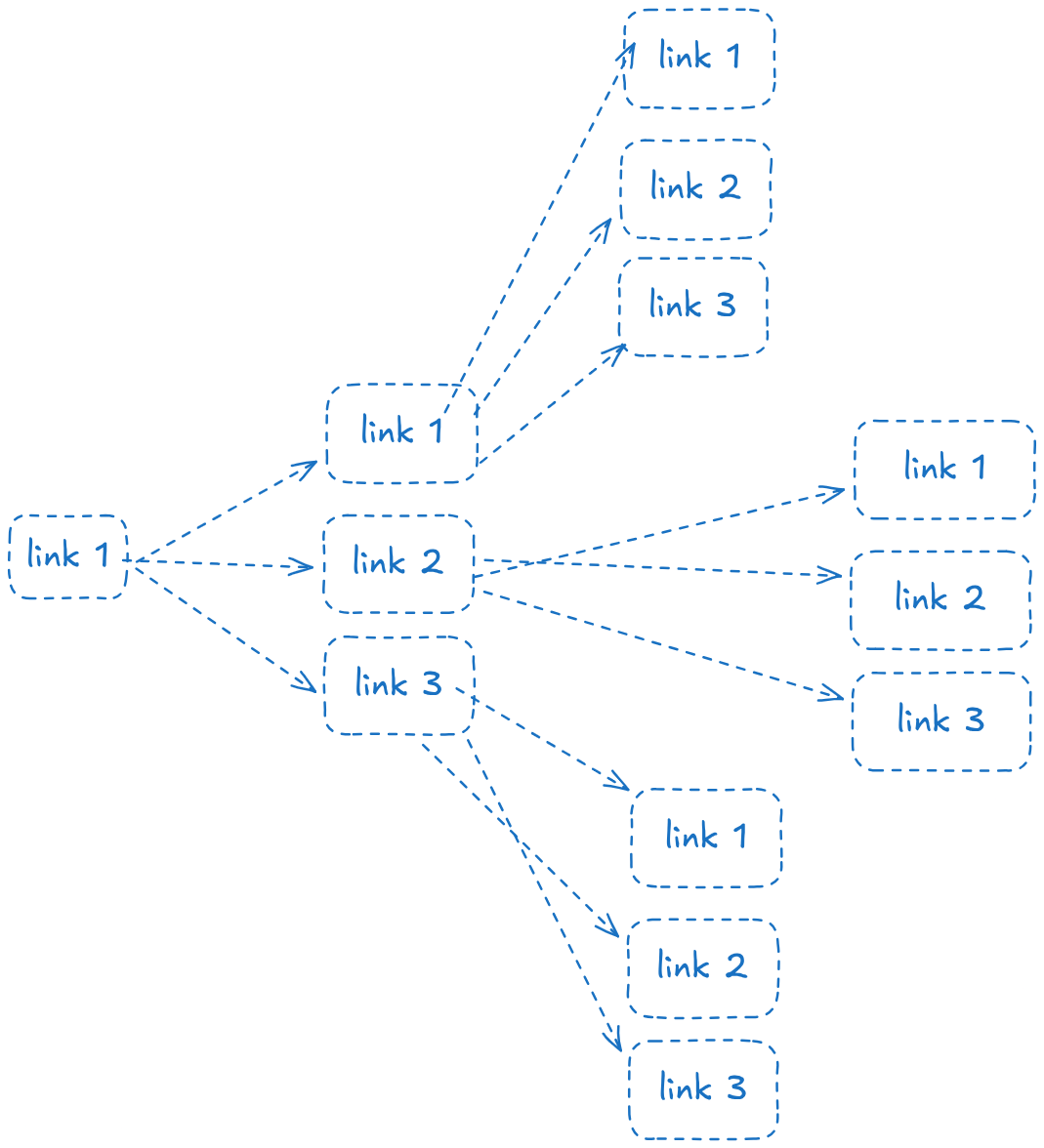
They can serve for different things:
- Indexing pages for search engines.
- Crawlers like
GoogleBotare used for the Google search engine to index pages and evaluate their importance.
- Crawlers like
- Web mining.
- This is particularly useful for many companies to find niche resources for other companies, videos, materials, and so on. It can also be useful for finding anything that is very obfuscated and lost.
- Web archiving.
- Used for collecting websites and archiving them, for example, the EU government has such an archive where it stores a lot of sites that should be archived for future purposes.
- Monitoring
- Crawlers can be used to verify that no copyright rights are violated.
Step 1: Understand the problem and define a scope
A quick design would be:
- Providing a set of URLs to the crawlers, which recursively go into them.
- Collect all available URLs.
- Use these URLs to repeat the process.
This is a very basic design, which likely is going to be implemented for a pet project. In the real world, we have to put more thoughts and extract more information before making the design.
Asking some important questions:
- What is the main purpose of the web crawler? Is it going to serve for page indexing, web scraping, or monitoring?
- It’s for page indexing.
- How many pages should the crawler be able to collect per month?
- 1 million pages.
- What is the content that should be extracted from the URL? Is it the HTML, videos, or images?
- HTML only.
- What if we encounter a page that was already seen?
- Ignore duplicates and seen websites.
There are a few other notes that should be considered when talking with the interviewer.
- Politeness - Since the crawlers are going to make requests to those websites, we have to be careful with the number of requests, because we don’t want to DDoS the services.
- Scale - The web has enourmous amount of websites, we have to consider using some kind of performance optimizations like parallelization.
- Extensible - Our current design only needs to support HTML extraction. However, it’s good to consider building the system in such a way that it can be easily extended.
Step 2: Propose a high-level design and dive into it.
The design provided below is taken from different studies (The image is from the book).
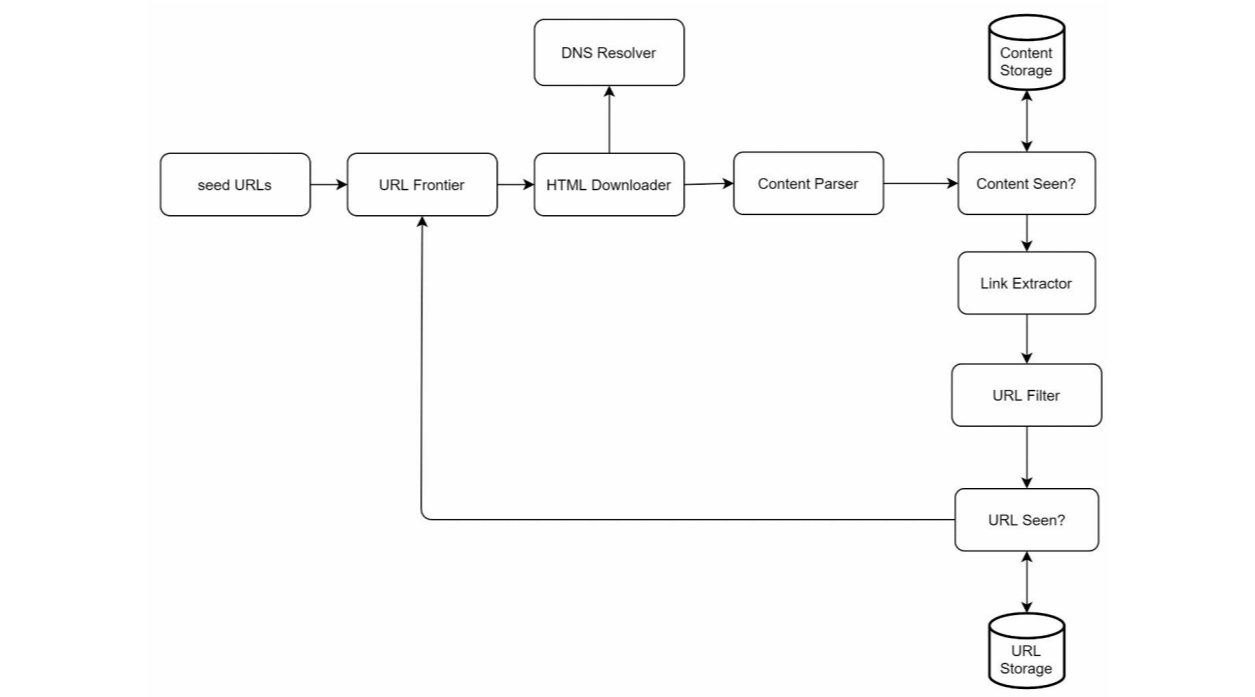
- Seed URLs
- First, we have to provide a set of URLs as a starting point for our crawlers. A good seed has as many URLs as possible for the initial run. We can divide these URLs by topics, locality, or other characteristics.
- URL Frontier
- This is a queue-like component that stores URLs to be downloaded next. In practice, it is often implemented using multiple queues and priority scheduling to support politeness and ranking.
- HTML Downloader
- Extracts the HTML from the page.
- Content Parser
- Parses the HTML content and extracts useful information (such as text and metadata). It can sanitize, normalize, parse, and extract links + text.
- Content Seen
- Checks whether the page content was already seen. Since comparing full pages is expensive, we compute a hash (or checksum) of the normalized content and compare hashes instead.
- Content Storage
- Used to store the extracted HTML content. The content should be stored on disk because one HTML page can be very large, and in-memory storage won’t be a feasible option.
- URL Extractor
- Extracts the links from the HTML. We should consider relative and absolute paths.
- URL Filter
- Excludes links with different content types, blacklisted ones, with unwanted file extensions, etc.
- URL Seen
- Checks against a storage to see whether the URL was already visited.
Step 3: Deep Dive
Starting with the algorithms for web traversing. We have two options: DFS or BFS.
- DFS is not preferred because the depth could become very large, and we have to consider some mechanism to stop going deeper; otherwise infinity loop could occur if we encounter cycles (also true for BFS).
- BFS is more commonly used because it explores pages level-by-level, which helps discover pages more evenly.
There are two problems with BFS:
- Most of the URL’s collected by the level run could refer mostly to the same host, which could be bad because we are going to flood the server with a lot of requests, especially if we end up using parallelism. This is called “politeness,” and it’s a good practice to follow.
- Using a normal BFS algorithm, we don’t have any priority over the scheduling of the URLs, which is not great because different pages could be more important than others, and visiting them first could benefit more.
Another important part is the URL Frontier. This is the component that stores the URL for further download in a queue data structure.
There are three key points when it comes to URL Frontier
Politeness - It’s a good practice to minimize the load that crawlers can create on the servers from which is fetching data. A crawler can become a point of a DOS attack by sending a lot of requests. Mappings between the web host and the downloader(worker thread) are made. Each thread has its own Queue and fetches the content from the URLs inside the queue.
For example:
We have a queue router that uses the mappings to route the processing between different queues. The Queue Selector distributes the queues to different worker threads using the mappings. The worker threads are downloading/pulling the URLs content and potentially scheduling new ones.
Priority is another key point. Different websites have different weights, for example:
Facebook Marketplace should be prioritized first because it has the highest rank page, which means it’s more useful and searchable by other people, instead of other related websites with lower “stats”.
Freshness is important because websites are constantly added, updated, or removed, so the crawlers should periodically re-crawl the sites that were already downloaded. We can prioritize important pages to be re-crawled more often.
Storage is another important part of the URL frontier, since the queue can become very large due to the number of links that could be found/scheduled. So, putting everything in memory is not very efficient; we would need some disk storage. We have to be careful, because if we put everything on disk, the latency for writes and reads would become a bottleneck.
We can maintain the state in memory and save it at intervals to disk to reduce latency.
HTML Downloader
Before looking into this component, let’s first check the robots.txt file. This file is written following the Robots Execution Protocol . The first thing when calling a server for a resource, the crawler checks robots.txt before crawling to see whether there is some restriction on crawling, and follows other rules.
Performance is also important; a crawler running on a server with multiple threads can download HTML in parallel, which is way better than using a single thread for the crawler. The URL Frontier has to send/distribute jobs for these crawler servers.
Locality of the crawler servers is important for downloading because if the crawler server that handles a particular website is far away from it, latency becomes a problem.
Setting timeouts for a crawler run can save us from wasting time downloading huge pages or getting stuck.
Extensibility
At some point, we may want to parse another content type, not only HTML (for our case, it’s only HTML), so if we have built our layer for Link extraction with extensibility in mind, we can assemble a module with different parsers inside, like Image downloader, PDF downloader, etc.
Avoid problematic content
30% of the web pages are duplicates (taken from the book). Using hashes and checksums can help to avoid duplication.
Another problem might be websites that are so-called “spider traps” - They can put the crawler in infinity loop. One way of preventing is to put a maximum URL length.
Step 4. Wrap up
Having more time, we can talk about:
- Server-side rendering - Web pages often ship JavaScript, which can make AJAX requests; the requests’ URLs might be dynamically generated, thus if the crawler only looks for links on the initial HTML can miss important ones. In this case, crawlers can render the page on the server side and collect the dynamically generated links. This can happen with tools like puppetier, playwright and other libraries.
- Horizontal scaling - Services have to be stateless for this one.
- Database replication and sharding to improve availability, scalability, and reliability