System Design Interview Chapter 4
System Design Chapter 4: Design A Rate Limiter
Notes from System Design Interview Chapter 4 on rate limiter requirements, algorithms, distributed counters, and tradeoffs.
System Design Interview series: Chapter 4 - Design A Rate Limiter Summarizing chapters
Rate limiter overview
In a network environment, a rate limiter is used to control the traffic sent by a client or a service.
It’s used to enforce constraints on the number of requests allowed to be processed within a certain period of time. If the requests exceed the allowed amount, they will be rejected.
It’s very useful for preventing DoS (Denial of Service) attacks.
Another benefit of using a rate limiter is that it lets us impose constraints on APIs that could incur costs. For example, it’s very common to use AI APIs these days, and since they cost money, we need a rate limiter so users can’t exhaust our quota.
There are different places where the rate-limiting application code can live and run.
- Client environment — It’s not a good place to put the rate limiter because the client-side part can be altered by the user, so it’s not secure. Another drawback is that we may not have access to the client side at all.
- Server environment (within the service that should be rate-limited) — This is a potential solution, depending on the scale of the system. If we have just one service that is not horizontally scaled, it’s not a bad idea. However, in a microservice architecture, putting the rate limiter within the service is not a good practice because if we scale the service, we can no longer easily track the user’s rate-limit state. Each instance would have an independent rate-limit state, so one user could still exceed the intended limit by spreading requests across instances. Another drawback is that we don’t have an early exit, and we still allow hits to the service where the business logic lives.
- RM as API Gateway - The best solution for a distributed system is to create a separate service with shared state across all service instances. This way, we will have one source of truth whether the user can or can not make a request; we won’t hit the main server if the user has been rate-limited, which improves the performance.
When it comes to implementation, there are different algorithms that each have pros and cons.
Fix-sized window
The time is sliced in fix-sized windows where each window has a predefined allowed throughput (counter).
If the counter is 10 requests per 1 minute, if the user exceeds this limit, other requests will be thrown away until a new window is created.
A pitfall of this algorithms lay when a lot of request comes when the time window has almost ended.
Example:
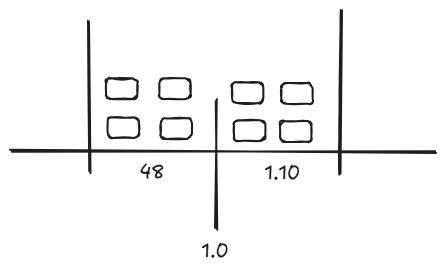
Scenario:
- At second 48 → user sends 4 requests (allowed, first window)
- At 1 → a new window starts
- At 1 → user sends 4 more requests (allowed, second window) The result is: the user makes 8 requests in 22 seconds, even though the rate limit is 4 per minute
Pros:
- It’s memory efficient, because for each identifier it needs to track the counter and lastWindowTimestamp + window time.
- Simple to reason and implement
Cons:
- The scenario above basically occurs when a burst of requests happens at the edge of the window.
Token Bucket Algorithm
The token bucket algorithm has a predefined bucket capacity. The refiller adds requests/tokens at a certain interval to the bucket until the capacity is reached. Once the bucket is full, new tokens overflow.
A token is basically a request. When a new request comes first, we check whether there are any tokens available; if yes, the request consumes the token, and it’s added to the bucket, otherwise it’s thrown away.
There are two parameters:
- Bucket Capacity
- Refiller rate - Interval on which tokens are added to the bucket
A bucket is typically created per client (e.g., per user, API key, or IP address).
Pros:
- Simple to implement
- Memory efficient.
- Allowing a burst of requests until the bucket is full.
Cons:
- Tuning the parameters
The token bucket allows bursts because tokens accumulate during idle periods and can be consumed instantly, while the refiller rate only controls how fast the bucket refills after depletion.
Sliding Window Log Algorithm
This algorithm fixes the issues with the Fixed window algorithm by making the window dynamic. We are persisting the timestamp of each request in a cache like Redis. When a new request comes, first we remove the outdated timestamps within the cache (timestamps older than the start of the current window). Then, the request timestamp is added to the cache, and if the size of the cache, a.k.a window, is greater than the allowed, we throw away the request, otherwise we accept it.
Pros:
- Very accurate, since the window is rolling, we are ensuring no more than the allowed requests will be accepted.
Cons:
- Memory consumption since we have to persist timestamps of the declined requests also
High-level Architecture of RM
At a high level, we need a counter that keeps track of how many requests the user/identifier made so far. If the counter is greater than the limit, further requests are rejected.
On a big scale, these counters are stored in some cache because the access is faster than if they were on disk.
Deep dive
Depending on the rate limiter, there are rules (files) where we can define and configure capacity, window size, and all of this information that the rate limit needs to work for our needs.
The RM, when declining a request, returns an HTTP status code 429 (Too many requests) so that the client can know whether the request was accepted or rejected because of rate limiting. There are different headers; I assume that those in the book are specific to the case of the example, where the author uses some open-source RM.
These headers can show how many requests we can still make, what the limit per window is, and the number of seconds until we can again make requests.
It’s possible when the RM declines a request to put it for later processing, since some systems have to ensure that no requests are lost.
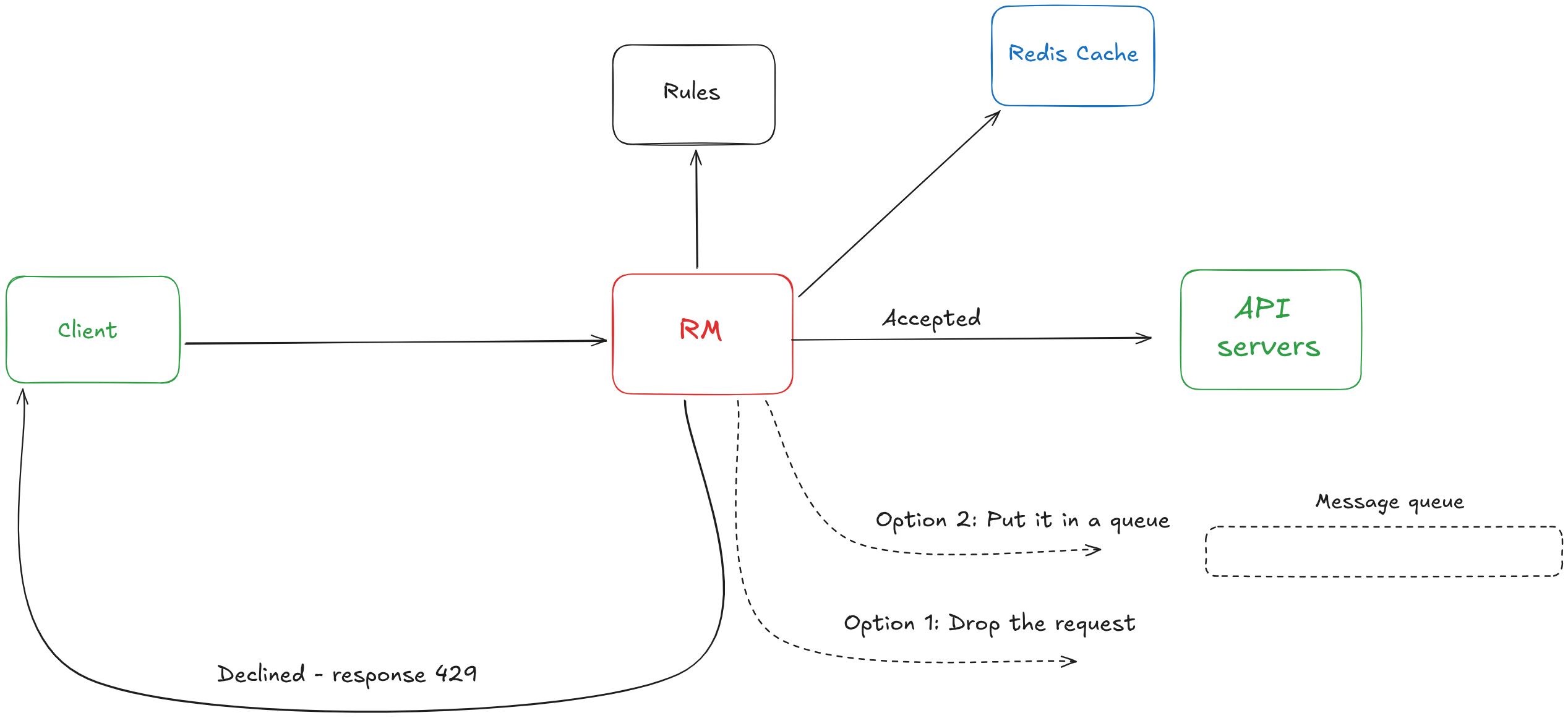
- Rules are stored on disk, where workers are pulling from it on certain period and update the cache, which the RM is calling.
- The client sends a request, the RM using the identifier, pulls the bucket from Redis, and checks if the request should be accepted or declined
- If accepted, it’s passed to the API server
- Otherwise, it’s either thrown away or placed in a queue for later processing
- In both cases, the client receives a response 429 with the necessary headers
In a Distributed Environment
So far, I was working with a single server environment; however, when it comes to rate-limiting multiple servers in a distributed environment. Two major problems occur.
- Race conditions
- Synchronization issues
Right now, the steps are:
- Request comes
- Read the counter from Redis
- Check if counter + 1 exceeds the limit
- No - throw
- Yes, update the counter and proceed with the request
When the RM is horizontally scaled, concurrent requests from the same user can cause a race condition when updating a shared counter.
If the same user sends two requests at the same time, those requests may be routed to different RM instances.
All RM instances use Redis as shared storage to keep track of the user’s request count.
Assume:
- The user’s current counter value in Redis is 2
- The rate limit allows up to 3 requests
Example:
- RM instance A reads the counter from Redis → gets 2
- RM instance B reads the counter from Redis → also gets 2
- Both instances independently check 2 + 1 ≤ 3
- Both checks pass
- Both instances allow the request and increment the counter
As a result:
- The user makes 2 requests, but both are accepted
- The rate limit is violated even though the logic looks correct
When the RM is horizontally scaled, there are multiple RM instances handling requests. Requests from the same user can be routed to different instances.
If the rate-limit state (the user’s bucket or counter) is kept in memory:
- Each RM instance has its own local state
- The same user may appear as “new” on different instances
- The user can bypass rate limits unintentionally
In a distributed system, we cannot guarantee that all requests from a user are handled by the same RM instance.
One way to address this is sticky sessions, where all requests from a user are routed to the same RM instance. However, a better approach is to use shared storage, where all RM instances read and write the same per-user state.
Performancy & Metrics
I did not understand much from the first part (performance), only this:
Since the latency should be low when users are making requests, and the RM is located in different data center cloud providers have built edge servers across the globe for such purpose to reduce latency.
For moniting is important to gather metrics on how the RM is working to see whether it’s too strict or the opposite. We can use those metrics to tune it.