System Design Interview Chapter 15
System Design Chapter 15: Design Google Drive
Notes from System Design Interview Chapter 15 on file storage, metadata, upload/download APIs, sync, and conflict handling.
System Design Interview series: Chapter 15 - Design Google Drive Summarizing chapters
Step 1: Understand the problem and define a scope
Designing Google Drive is a huge task, so instead, let’s collect the most important information by asking the correct questions.
- What are the most important features?
- Upload, download files, synchronize updates across shared files, and different devices.
- What devices should support?
- Mobile and desktop.
- What are the supported file formats?
- Any format should be fine.
- What is the file limit size?
- 10 GB per file.
- How many DAU do we expect?
- 10 Mil DAU.
In this design, we have to focus on adding files to the drive, downloading files to the local machine, synchronizing file updates across different devices, and also synchronizing the updates whenever a file is shared across multiple people. Also, it’s good to focus on notifications when a file is edited, deleted, or added.
Back-of-the-envelope estimation
- Assuming we have 50 mil signed up users and 10 mil DAU.
- Each user gets 10 GB of free space and 2 uploads per day.
- The average size of a file is 500 KB.
- The ratio for reads and writes is 1.
- The total space needed for such amount of users is:
- 50 Mil * 10 GB free space = 500 Petabytes. (Provisioned capacity, not actual usage)
- For Upload, we expect: 10 mil DAU * 2 uploads/day / 24 / 3600 = ~ 230 QPS
- The peak is 240 * 2 = ~ 460 QPS
From these numbers, we can see that storing and serving data at this scale cannot be handled by a single machine. The amount of data is simply too large, and the system must be able to grow over time.
To address this, we need to distribute data across multiple machines. Metadata such as user information and file mappings can be stored in a relational database that is sharded and replicated for scalability and availability. The actual file contents should be stored in a distributed object storage system, which is designed to handle large volumes of data reliably.
Using managed storage solutions such as Amazon S3 (or S3-like systems) allows us to offload concerns like durability, availability, and scaling, enabling the system to handle increasing traffic and storage requirements without major architectural changes.
(I am using knowledge from the previous chapter)
Step 2: High-level design
The approach here, used in the book, is to start with a single server and expand to handle millions of users.
We are going to introduce:
- A Web server that allows uploads and downloads
- A database to store the metadata for the files, user information, login sessions, etc.
- File storage system with 1 TB of allocated memory space.
This design is very simple; we can create an Apache server that will serve the UI with the API.
One PostgreSQL or MySQL will handle the storage for the relational data, and we can spin another service where we can create a directory called /drive and within that dir we can create another dir called namespace for each user. User files are going to be stored within the namespace for the exact user.
API (Initial Design)
Upload APIs
Simple Upload
- Used for small files and stable network conditions.
- The client uploads the entire file in a single request.
POST /files/uploadBody: <file data>Resumable Upload
- Used for large files or unreliable networks.
- The upload process is split into multiple steps.
Create upload session
POST /files/upload?uploadType=resumableResponse: resumable upload URLUpload file chunks
PUT <resumable-upload-url>Body: <file chunk>Resume upload if interrupted
- The client queries upload state and continues from the last uploaded chunk.
Download API
- Used to download a file from the user’s drive.
GET / files / { fileId } / download;Metadata APIs
- Used to manage file and user metadata.
GET / files / { fileId };GET / files;DELETE / files / { fileId };The main limitation of this initial design is file storage. It is not feasible to store all user files on a single server with limited disk capacity.
A way to improve it is to add more storage servers and distribute files using sharding. For example, we could shard files by user_id and use a modulo operation to determine which server stores a user’s files, using the number of servers. While this approach allows horizontal scaling, it introduces serious reliability issues. If a storage server goes down, all files stored on that server become unavailable, resulting in data loss unless replication is added. In addition, changes to the server pool would require rebalancing users across servers.
To address these issues, we could introduce consistent hashing. By placing storage servers on a hash ring and using virtual nodes, we can distribute data more evenly and minimize reassignments when servers are added or removed. This improves availability and scalability, but it also significantly increases overall complexity. We would need to manage replication, failure recovery, rebalancing, and ongoing infrastructure maintenance.
A better approach is to outsource file storage to a managed object storage service such as Amazon S3.
Amazon S3 provides durable object storage with built-in replication across multiple data centers, automatic horizontal scaling, and very high reliability (often described as “eleven nines” of durability). By using S3, we can avoid managing storage infrastructure ourselves and focus on core application logic instead. (Taken from S3 docs)
We can introduce a load balancer and horizontally scale our Web server since they are stateless. Also, we can shard and create replicas for our Metadata Database to meet the scale and availability requirements.
After these improvements, our design looks like this:
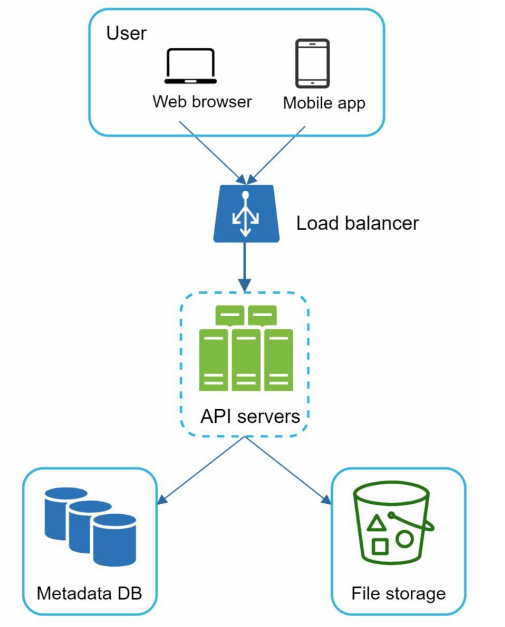
We have a load balancer that servers request from clients to API servers, and two storages, one for metadata and one for file storage.
Sync Conflicts
One of the core features of the system is shared file access, where multiple users can edit the same file. This introduces the possibility of synchronization conflicts.
For example, User A and User B may open the same file at roughly the same time. If User A saves their changes at timestamp X and User B saves their changes shortly after at timestamp X + 1, User A’s update will be stored first. When User B attempts to save, their version may overwrite the newer version created by User A.
To prevent accidental data loss, the system must detect this conflict. When a conflict occurs, User B should be notified that a newer version of the file exists. The system can then provide options to:
- Merge the changes
- Discard the local changes
- Overwrite the existing version and create a new file version
In this way, the system ensures data consistency while still allowing concurrent collaboration.
High-level design
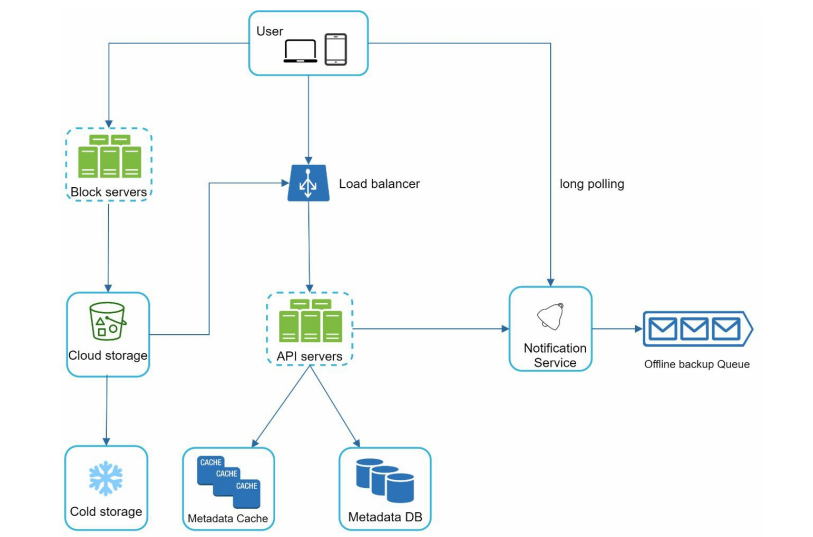
-
Clients Clients are responsible for initiating uploads, downloads, and synchronization requests.
-
Block Servers Block servers handle file uploads. They split each file into fixed-size blocks, compute a hash for each block, and store these hashes in the metadata database. Each block is treated as an independent object and uploaded to cloud storage. To reconstruct a file, blocks are retrieved and assembled in the correct order using the stored metadata.
-
Cloud Storage Cloud storage stores the individual file blocks. It provides scalable, durable, and highly available object storage for user data.
-
Cold Storage Files that have not been accessed for a long period of time can be moved to cold storage. Cold storage is optimized for cost rather than latency and is typically used for archival data. Although access is slower, enterprise cold storage still guarantees durability and availability.
-
Load Balancer The load balancer distributes incoming requests evenly across API servers, ensuring scalability and fault tolerance.
-
API Servers API servers expose endpoints for managing file metadata, user profiles, authentication, and permissions. They also interact with the notification service and coordinate metadata updates during uploads and downloads.
-
Metadata Database The metadata database stores user information and file metadata such as file size, MIME type, timestamps, block hashes, and versioning information. Actual file data is not stored here.
-
Notification Service Clients establish long-polling connections with the notification service. When file-related events occur, such as uploads, updates, or deletions, the notification service notifies relevant clients to synchronize changes.
Step 3: Deep dive
In the deep dive, we are going to look at the block servers, metadata database, upload/download flow, and notification service.
Block servers
For large, frequently updated files, sending the entire file on every change would consume significant bandwidth. To reduce network usage, we apply two main optimizations:
- Delta sync: When a file is modified, only the blocks that have changed are synchronized instead of re-uploading the entire file.
- Compression: Blocks are compressed before upload to reduce their size. Different compression algorithms are used depending on the file type, for example, gzip for text files, and specialized algorithms for images and videos.
In our system, block servers handle the heavy lifting during file uploads. They process files received from clients by splitting them into blocks, compressing and encrypting each block, and uploading them to cloud storage. As a result, only modified blocks are transferred instead of the whole file.
When a new file is added, the block server performs the following steps:
- Split the file into smaller blocks
- Compress each block using an appropriate compression algorithm
- Encrypt each block to ensure security
- Upload the blocks to cloud storage
When an existing file is updated, delta sync is applied. Only the blocks that have changed—such as “block 2” and “block 5”—are uploaded to cloud storage, while unchanged blocks remain untouched.
By combining delta sync and compression, block servers significantly reduce network traffic and improve upload efficiency.
Metadata Database
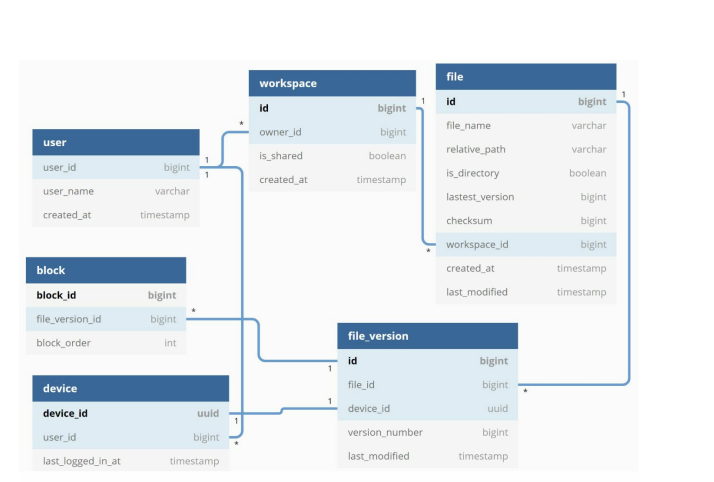
The figure above shows a simplified metadata database schema. It includes only the most important tables and fields needed to support file storage, versioning, and synchronization.
-
User Stores basic user information such as username, email, and profile photo.
-
Device Stores information about user devices.
-
Workspace Represents the root directory of a user.
-
File Stores metadata related to the latest version of a file, such as file name, size, MIME type, timestamps, and ownership information.
-
File_version Stores the version history of a file. Each row represents an immutable snapshot of a file at a specific point in time.
-
Block Stores metadata about individual file blocks.
Upload flow
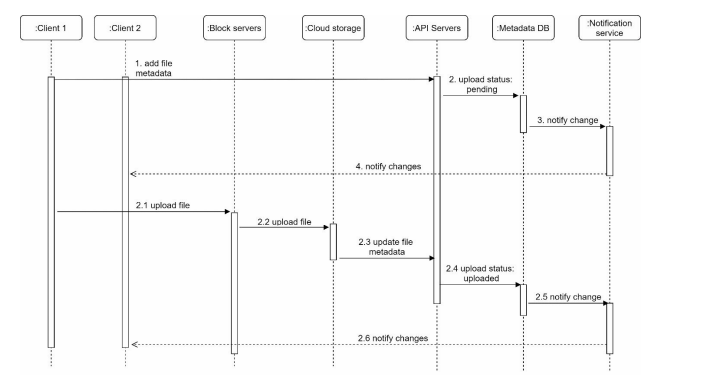
Two requests are sent in parallel when a new file is added: one to create file metadata and one to upload the actual file content. Both requests come from Client 1.
Add file metadata
- Client 1 sends a request to create metadata for the new file.
- The API server stores the metadata in the Metadata DB and sets the file upload status to “pending.”
- The API server notifies the notification service that a new file is being uploaded.
- The notification service informs relevant clients (for example, Client 2) that a new file upload is in progress.
Upload file to cloud storage
- Client 1 uploads the file content to the block servers.
- Block servers split the file into blocks, compress and encrypt each block, and upload them to cloud storage.
- When the upload completes, cloud storage triggers an upload completion callback to the API servers.
- The API server updates the file status in the Metadata DB to “uploaded.”
- The API server notifies the notification service that the file upload is complete.
- The notification service notifies relevant clients (Client 2) that the file is fully uploaded.
When an existing file is edited, the same flow applies. The only difference is that delta sync is used, meaning only the modified blocks are uploaded instead of the entire file.
Download Flow
The download flow is triggered when a file is added or edited by another client. A client can learn about such changes in two ways:
- If Client A is online when a file is modified elsewhere, the notification service informs Client A that changes are available and that it should pull the latest updates.
- If Client A is offline when a file is modified, the updates are stored and propagated later. Once the client comes back online, it pulls the latest changes.
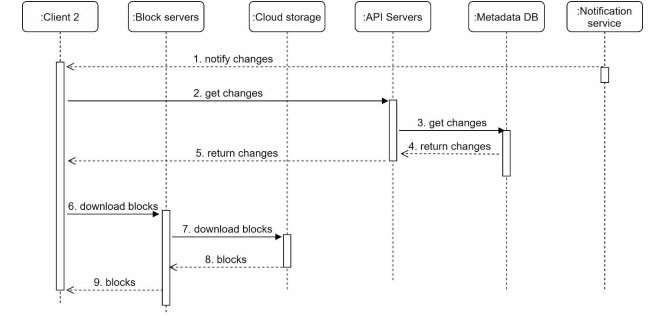
After a client is notified that a file has changed, it first fetches metadata and then downloads the required blocks to reconstruct the file.
- The notification service notifies Client 2 that a file has been modified elsewhere.
- Client 2 sends a request to the API servers to fetch the latest metadata.
- Client 2 requests the required file blocks from the block servers.
- Block servers fetch the blocks from cloud storage.
- Client 2 downloads the blocks and reconstructs the file locally.
Notification Service
The notification service is responsible for informing clients when file changes occur.
At a high level, the notification service sends events to clients as changes happen. There are two ways of implementation:
- Long polling: Clients keep a request open until the server responds with an event.
- WebSocket: Provides a persistent, bi-directional connection between clients and servers.
Although both approaches are viable, we choose long polling for the following reasons:
- Communication is mostly one-way. The server notifies clients about file changes, but clients do not send messages back through the notification channel.
- File change notifications are infrequent and do not require real-time, low-latency bi-directional communication, making WebSockets unnecessary overhead.
Saving Storage Space
To reduce storage costs while supporting file versioning and reliability, the system applies a few optimizations. Identical data blocks are de-duplicated using hash values, preventing redundant storage. Infrequently accessed data is moved to cold storage, which is significantly cheaper and optimized for archival use.
Failure Handling
Failures are expected in large-scale systems, so components are designed to be fault-tolerant. Load balancers, API servers, caches, and queues rely on replication and automatic failover. Stateless services allow traffic to be redirected when failures occur. Storage systems replicate data across regions to ensure durability. When a component fails, healthy replicas take over, and the system recovers without user-visible data loss.
Step 4: Warm up
Finally, we explored potential system evolutions, such as separating
We designed a scalable file storage system inspired by Google Drive, focusing on:
- Upload/download, sync across devices, and shared file collaboration with notifications.
- Metadata stored in a sharded relational database; files stored in distributed object storage (e.g., S3) to handle petabytes of data and millions of users.
- Block-level storage, delta sync, compression, and deduplication minimize network and storage usage.
- Replication, cold storage, and fault-tolerant services ensure durability and high availability.
If we have more time, we can discuss:
- Using presigned URLs to allow clients to direct uploads to the cloud storage.
- This “Trust-But-Verify” method allows clients to upload files directly to storage, while the service verifies each chunk’s presence and integrity, reducing latency and server load without sacrificing reliability. (I saw this on Hello Interview Youtube channel)