System Design Interview Chapter 14
System Design Chapter 14: Design YouTube
Notes from System Design Interview Chapter 14 on video upload, transcoding, storage, CDN delivery, metadata, and scaling.
System Design Interview series: Chapter 14 - Design YouTube Summarizing chapters
Step 1: Understand the problem and establish a scope
YouTube as a product is massive; it has a lot of features, such as watching, creating videos, commenting, sharing, etc. On an interview that lasts 45 - 60 minutes, it’s impossible to cover all of them, so let’s ask the most important questions and collect the most important requirements.
- What are the important features?
- Upload and watch a video.
- What devices are supported?
- Mobile and desktop.
- How many DAU do we have?
- 5 mil.
- Do we need to support international users?
- Yes, as our base is mostly international.
- What are the supported video resolutions?
- We have to support all of the necessary resolutions and formats.
- Do we have to enforce file size?
- Yes, our product supports small to medium files with a maximum of 1GB.
We can also use the back-of-the-envelope technique to gather some estimates.
- Assuming 5 mil DAU.
- Each user watches 5 videos per day.
- 10% of the DAU are uploading videos each day.
- The average size of a video is 300 MB.
- On a daily bases we would need to store:
- 5 mil _ 10 % _ 300 MB = 500 000 * 300 MB = 15 000 000 000 MB Or 150 TB per day.
For video retrieval, we would store our data in CDNs across the globe, so we can reduce latency. CDNs often charge by the data transferred in GB. For our case:
5 mil _ 5 videos/day _ 0.3 GB * 0.02$ (assume per GB) ⇒ 150 000$ per day
Step 2: High-level architecture
In the high-level design, we are going to use Content Delivery Networks (CDNs), which are globally distributed edge servers that cache and deliver media content close to users. CDNs allow us to store and stream videos efficiently, reducing latency, bandwidth costs, and load on our core infrastructure.
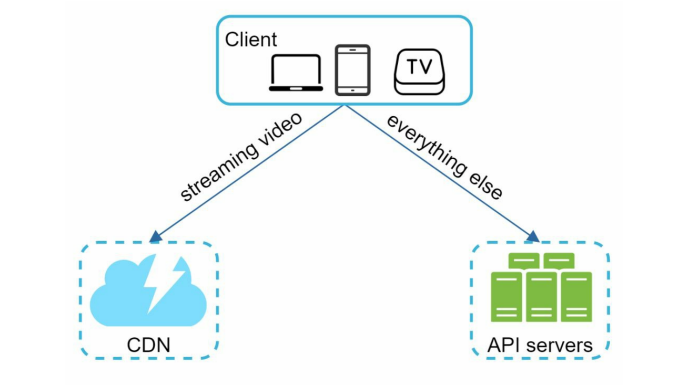
Clients can make a READ request to watch a video, which goes to the closest CDN, and the content is streamed to the client. For any other use case, such as signup, update user metadata, video metadata, etc., the client is going to use the API servers.
Good and interesting topics to be explained in the high-level design are:
- Video uploading flow;
- Video streaming flow;
Video uploading flow
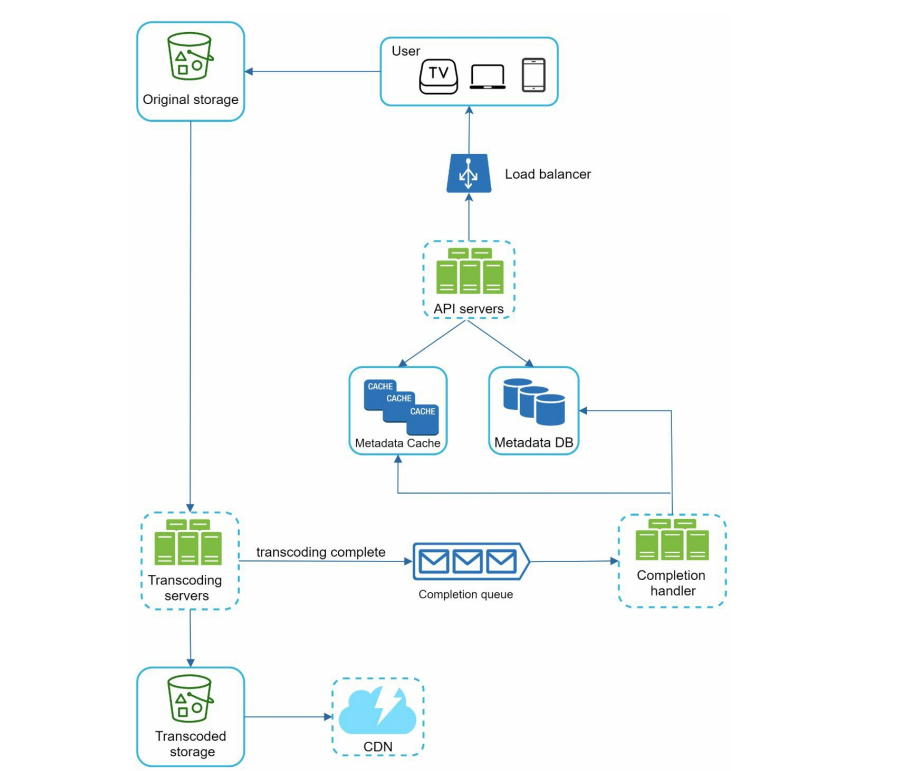
Flow of uploading:
- User uploads the video to the original storage.
The original storage is BLOB (Binary Large Object) storage, which persists the original video as-is without any encoding.
- Transcoding Servers receive the raw video and encode it at different resolutions (240p, 480p, 720p, etc.). It encodes the video in different formats (HLS, DASH, etc.).
HLS and DASH are adaptive streaming protocols that split videos into small chunks and dynamically adjust video quality based on device and network conditions.
- The encoded versions of the video are stored in Transcoded Storage.
- The user is going to pull chunks from this storage.
- When processing is completed, the Transcoding servers schedule a job in the message queue.
- The Completion Handler worker consumes the event and saves the necessary metadata inside the Metadata DB. This way, the video becomes visible to the user and also playable.
- CDNs pull from the Transcoded storage and can prewarm popular content.
The upload process consists of two asynchronous paths that run in parallel:
- storing and processing the video content
- updating video metadata to make the video discoverable and playable.
Flow A: Video upload and processing
- The client uploads the raw video to the original storage.
- Transcoding servers retrieve the video from original storage and generate multiple formats and resolutions.
- Once transcoding completes:
- The transcoded video files are stored in transcoded storage and made available to the CDN.
- A transcoding completion event is published to the completion queue.
Flow B: Metadata update
- Completion handlers consume transcoding completion events from the queue.
- Metadata related to the video (URL, formats, resolutions, size, and ownership) is updated in the metadata database and cache.
- After metadata is updated, the video becomes available for streaming.
Finally, the API servers notify the client that the upload has completed and the video is ready to be viewed.
Video Streaming Flow
When a user watches a video on YouTube, playback works as follows:
- The video is streamed from the closest CDN edge to minimize latency.
- Instead of downloading the entire video at once, playback happens in small chunks, allowing the video to start immediately and reducing memory usage.
- Adaptive bitrate streaming protocols such as HLS and DASH dynamically select the optimal video quality for each chunk based on the user’s network conditions.
Choosing the appropriate adaptive streaming protocol is important, as device and browser support vary. In practice, supporting both HLS and DASH ensures compatibility across a wide range of devices.
Step 3: Deep Dive
Before diving into the upload and streaming flows, let’s first examine video transcoding.
When a video is recorded, it is stored in a specific format and bitrate. However, different devices and network conditions require different video formats and quality levels. To ensure smooth playback across a wide range of devices, each uploaded video must be transcoded into multiple formats and bitrates.
Bitrate represents the amount of data transmitted per second when streaming a video. Higher bitrates enable higher video quality but require more network bandwidth. To balance quality and playback smoothness, adaptive streaming delivers higher-bitrate streams to users with fast networks and lower-bitrate streams to users with limited bandwidth.
On the client side, each video chunk is decoded using the appropriate compression algorithm, allowing playback to start quickly and continue smoothly as network conditions change.
The encoders consist of two parts:
- Containers - file/stream structure that packages one or more tracks (video, audio, subtitles), timestamps, and metadata
- Codec - (encoder/decoder) is the algorithm that compresses raw video or audio into a bitstream and decodes it back for playback. Codecs determine the compression method, quality trade-offs, bitrate, and encoding/decoding cost.
Users often request different post-processing features for a video: watermarks, subtitles, thumbnails, so it’s best to split transcoding into modular steps and run independent work in parallel.
Model the processing as a Directed Acyclic Graph (DAG)
- Each node is a single task (decode, transcode to a resolution, overlay watermark, inject subtitles, package, etc.), and directed edges show dependency/order.
The DAG lets you reuse shared upstream work, run independent branches concurrently, isolate failures to a single node, and scale workers horizontally to shorten end-to-end processing time.
DAGs are good because:
- Makes dependencies explicit; there is an order of work that can happen before proceeding to the next node.
- Enables parallelism because independent nodes (generating 240p/720p/1080p renditions) execute concurrently, reducing the overall latency.
- Prevents loops and models one-way data flow because processing is directional (raw → transforms → packaged), so the acyclic property matches the real workflow and avoids infinite loops.
Video transcoding architecture
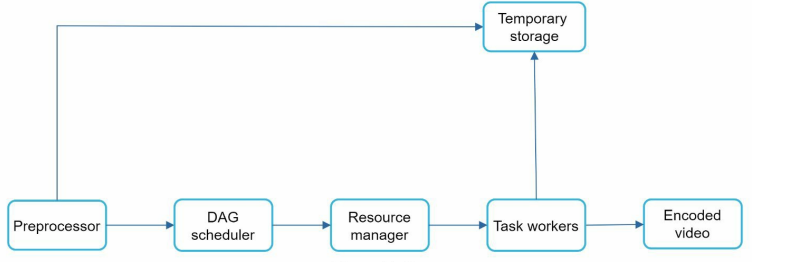
Let’s dig into the components of this diagram. It has 6 different stages/components that the video is about to pass.
Preprocessor
There are a few steps within the preprocessor algorithm:
- Video splitting: The upcoming video stream is further split into GOP (Group of Pictures). This is a chunk of frames arranged in order. It can be up to seconds in length. Older clients/devices may not support newer algorithms for video splitting; however, this should be taken into consideration in this step.
- Generate the DAG: Based on configuration files that were written by the programmers, a DAG is generated with the following nodes and edges.
- Caching data: We can cache these GOPs and other metadata, so if the processing fails, we can restore the broken state and not lose much of the information to continue from where it fails
Dag Scheduler
The scheduler splits the DAG into different job/tasks and puts them into a queue for the resource manager.
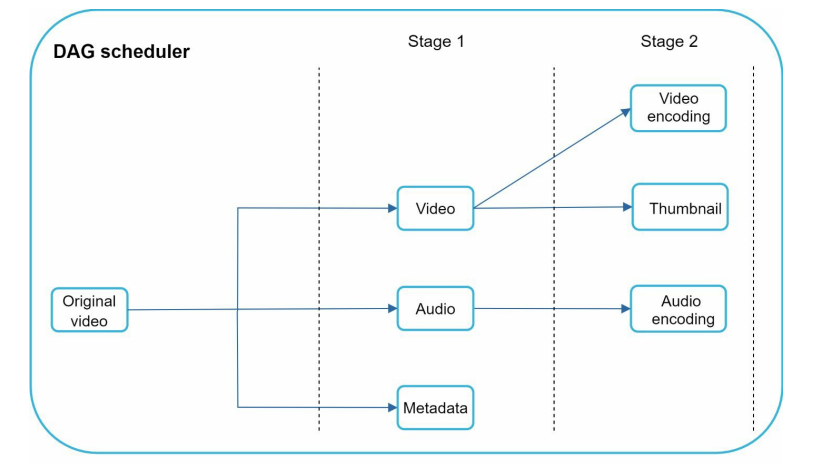
As shown in the figure above. We have split the work into two Stages.
Stage 1: Splits the Original Video into:
- Video
- Audio
- Metadata
Stage 2: Splits:
- Video into:
- Video encoding and creating a Thumbnail
- Audio into:
- Audio encoding
We can utilize parallelization for Stage 2 of the video.
Resource manager
Its responsibility is to manage the available resources efficiently. It has 3 queues and a task scheduler; the scheduler uses the queues to prepare the work for the workers and pass them the necessary information.
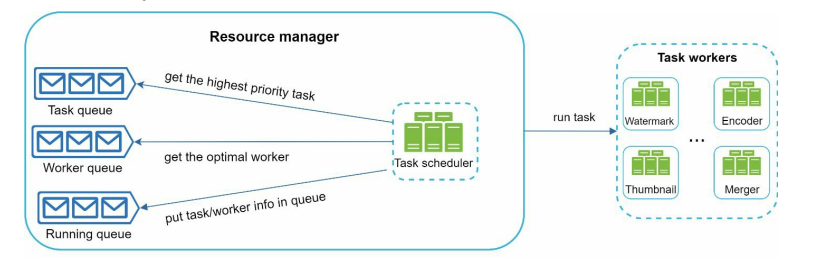
- Task Queue contains the tasks that should be executed; they come from the DAG.
- Worker Queue gets the optimal worker for the task. For example, if we have to add a thumbnail or watermark, we need the appropriate worker for that job.
- Running Queue holds the task/worker map that is currently running.
Task Scheduler it selectes the best mapping between worker and task and schedules their run.
Task workers
As we can see on the figure above, task workers runs the task that are scheduled by the Task scheduler.
Temporary storage
We store the blob of the audio, video, or other type of information into the temporary storage until the whole processing is complete.
Encoded Video
Finally, we get the video in an encoded format, for example, video_720p.mp4.
Speed optimizations
- For speed, break videos into keyframe-aligned chunks (GOPs/segments) so uploads are resumable and can be sent in parallel; this client-side chunking reduces retries and overall upload time.
- Place upload endpoints near users (use CDN edges or regional upload centers) to lower latency and increase throughput.
- Inside the processing pipeline, decouple stages with message queues and model work as independent tasks so encoding, packaging, and other steps can run concurrently.
- For safety, use pre-signed upload URLs or equivalent short-lived tokens so clients upload directly to storage with limited permissions.
- Retry transient failures with backoff, abort and return clear errors for non-recoverable faults.
- Make nodes idempotent and deterministic so restarts and caching work reliably.
Step 4: Wrap up
If there is more time we can check out:
- Horizontally scale the API servers as they are stateless.
- Scale the database (replication and sharding)
- Live streaming (but first I have to read about it)