System Design Interview Chapter 12
System Design Chapter 12: Design A Chat System
Notes from System Design Interview Chapter 12 on chat architecture, realtime delivery, presence, storage, and synchronization.
System Design Interview series: Chapter 12 - Design A Chat System Summarizing chapters
Step 1: Understand the problem and define a scope
There are different types of chat applications, such as Discord, Facebook Messenger, WhatsApp, etc. Some of them are better for one-to-one chat, and some for group chats with a lot of people in the group. We have to ask some clarifying questions to remove ambiguities.
- Is it a 1-to-1 chat or a group, or both?
- Both.
- Is it only for mobile or desktop?
- Both.
- How many users are going to use the chat daily?
- 50 Mil DAU
- Is it text only, or users can send media or attachments?
- It’s text-only messages.
Step 2: Propose a high-level design and dive in
The basic functionalities that the chat service should support are:
- Accept messages from users/clients
- Find the right user to send the message to.
- If the user is offline, store the message somewhere until they’re online and send the message out.
First, we have to understand what kind of communication patterns can be used and to choose the most optimal one.
The most common communication protocol is HTTP, which is a request/response protocol. A client sends a request to the server, and the server returns a response. In our case, if we choose to use the HTTP protocol, we have a few options:
- Pooling The client and server establish a TCP connection. Sending a message is a normal POST request to the chat service; Reading the chat history messages is a GET request.
The client sends GET requests on interval to the chat service to get the possibly new chat history and basically ask - “Are there any new messages?” Most of the time, the response is going to be negative, so we are just going to smash the chat service with useless requests.
- Long Pooling Almost the same as normal pooling, but here, instead of returning a response, the server holds the request (connection) until it has either a message to return or a timeout has been reached.
There are a few downsides to this approach:
- The sender and the receiver may be connected to different chat services because HTTP servers are stateless. When they are horizontally scaled, a load balancer may route the sender to one server and the receiver to another. As a result, they cannot share the same long-polling connection and must establish separate ones.
- The server can not easily determine if the client is offline.
- It’s not efficient if the users are not chatting much.
WebSockets
A much better approach is to use WebSockets. This is an upgrade over normal HTTP communication. The connection starts with an HTTP request in which the client wants to establish a WebSocket connection with the server. If the server agrees, both sides can then use a single bidirectional connection to send messages to each other.
Since WebSocket connections use ports 80 or 443, they are typically allowed through firewalls and can also be encrypted using SSL/TLS.
High-level design
We don’t need to move all services to WebSockets. Services such as User Profile, Authentication, and Service Discovery can continue to use normal HTTP with a request/response model. However, the Chat Service and the Presence Service should use WebSockets.
WebSocket-based services are stateful, meaning they maintain connection-specific state and preserve context between the sender and the receiver for the lifetime of the connection.
Clients should not change the chat service that they initially connected to, unless the service is down.
We may need to have a Notification Service because when recipients were not online for a certain period, we would like to inform them via SMS message, push notification, or email that they have been messaged when they come back.
For storage as was proposed in the book, a key-value store is good choice to store chat history, and a relational database for other schema-based information, such as user profiles, sessions, etc.
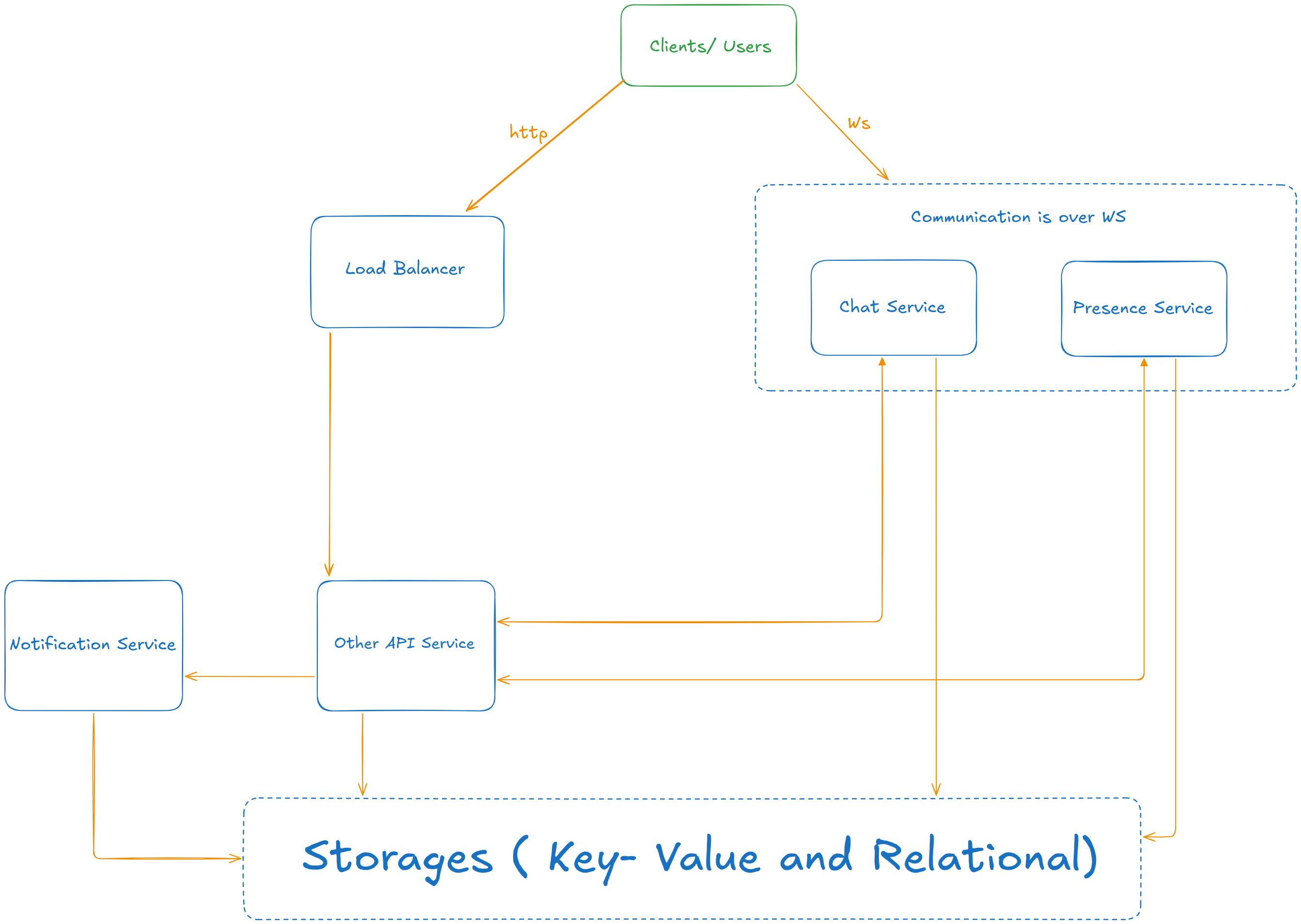
- Chat servers handle message sending/receiving.
- Presence servers manage online/offline status.
- API servers handle everything, including auth, profile, etc.
- Notification servers send push notifications.
- A key-value store is used to store chat history.
Storage
For storage we have to consider what kind of information is going to be stored from our application. We will have user profile information such as, username, email, etc. For this case, relational database is going to suit us well. However, for the chat history relational database won’t fit our needs.
Chat services experience a lot of writes thus if we use SQL database, on each write indexes that are created for fast reads has to be re-ordered which can lead to performance issues. Another pitfall is when having pagination because SQL uses OFFSET pagination not cursor based, and if we want to access items OFFSET 100 500 the engine will still go through the records. In NoSQL we can use cursor based pagination and apply binary search to get results that are within provided timestamp. SQL adds a lot of different metadata, indexes and other information for each row and thus we are going to have a lot of writes.
Chat history storage tradeoffs
Chat services experience a very high volume of writes. When using an SQL database, every write requires updating and maintaining indexes that are created for fast reads. These indexes often need to be rebalanced or reordered, which can lead to performance issues.
Another drawback is pagination. SQL typically relies on OFFSET-based pagination rather than cursor-based pagination. When requesting items with a large offset (for example, OFFSET 100 000), the database engine still has to scan and discard all preceding rows, which becomes inefficient as the dataset grows.
In NoSQL databases, cursor-based pagination is commonly used. This allows queries such as “fetch messages after timestamp X,” which can be implemented efficiently and often relies on sequential access or binary search over ordered data.
Also, SQL databases add significant overhead for each row in the form of metadata, indexes, and transactional information that can bloat the database unnecessarily since we don’t need this information for our chat history records.
Step 3: Deep Dive
We won’t have much time to go over all of the components, so let’s choose the most important and intriguing ones:
- Messaging flows
- Service Discovery
- Presence indicator
Messaging Flow
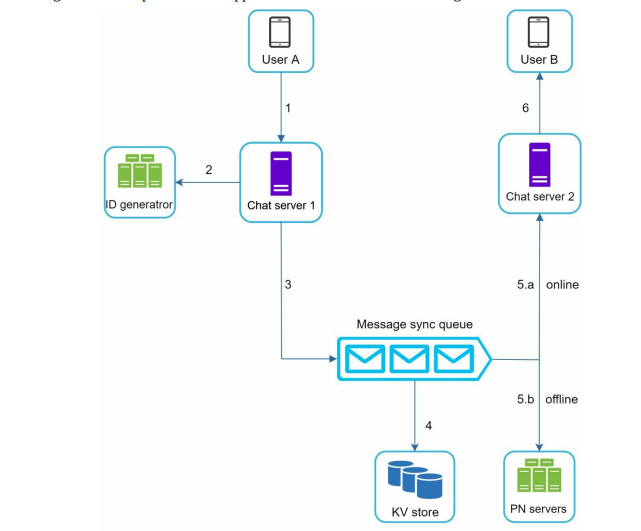
- User A sends a message to User B
- A WS request is send to the Chat Server 1 (the user A has established a connection with that server)
- Unique ID is generated for the specific record.
- The message goes through the sync queue where it’s stored in KV Store.
- If the server 2 is online, server 1 finds the server 2 and forwards the message through the WS connection up to User B
- If it’s offline, the Push Notification service is used to send a notification to the user.
Presence Service
This is a very common feature in chat applications. There different ways to update the presence status:
On Login
After the users has logged to the chat application and has established a WS connection with the service, the information is being stored in the KV store. We store last_logged_at timestamp and the user status.
On Logout
After the user logged outs (either lost a connection or purposefully logout from the chat) the chat service, the indicator is update to offline.
Handle unstable connections
Network issues can cause temporary disconnections. For example, a user might lose connection while going through a tunnel or metro, but reconnect shortly afterward. In this case, the user should not immediately be marked as offline.
To handle this, the presence service uses a heartbeat mechanism:
The server periodically sends ping messages to the client.
If the client responds within a configured timeout (for example, 30 seconds), the user remains online.
If the client fails to respond within the timeout, the connection is closed and the user’s status is updated to offline.
This mechanism helps distinguish between temporary network issues and actual logouts.
Notifying friends about presence changes
To allow friends to see each other’s presence updates, the system can use message queues or pub/sub channels.
Each user subscribes to presence update channels of their friends. When the presence service updates a user’s status, it publishes an event to the corresponding channels.
Example:
Suppose we have three users: A, B, and C.
A and B are friends; B and C are friends; C and A are friends
Each pair has a subscription channel for presence updates. When the presence service updates user A’s status, users B and C receive a notification through their subscribed channels, allowing their clients to update A’s online/offline indicator in real time.
Service Discovery
The purpose of having Service Discovery is to provide the client with the most optimal server that it can connect to based on different criteria such as geo location.
Example flow would be:
- User A tries to log in to the application.
- The request is routed by the load balancer to the Auth API server.
- When the user is authenticated, the service discovery finds the best chat server for User A. Let’s say, server 2 is chosen and the server info is returned back to User A.
- User A connects to chat server 2 through WebSocket.
Step 4: Wrap up
If there is more time we can talk about:
- End-to-end encryption ensures that only the sender and the receiver can read the message content. Messages are encrypted on the client before being sent and decrypted only on the recipient’s device.
- Frequently accessed messages, such as recent chat history or unread messages, can be cached to reduce database reads and improve latency.
- Messages sent while a user is offline should be persisted and delivered once the user comes back online. This may involves storage and retry mechanisms.