System Design Interview Chapter 11
System Design Chapter 11: Design A News Feed System
Notes from System Design Interview Chapter 11 on news feed generation, fanout, ranking, caching, and scaling.
system-designnews-feedarchitecture
View all chapters in System Design Interview System Design Interview series: Chapter 11 - Design A News Feed System Summarizing chapters
Step 1: Understand the problem and define the scope
Start by asking a few clarifying questions to remove ambiguity.
- Is it a mobile app, a desktop app, or both?
- Both.
- What are the key features?
- A user can publish a post, and their friends can view it in their news feed.
- How many friends can a user have?
- Up to 5,000.
- What is the traffic volume?
- 10 million DAU.
- What types of content should the feed support?
- Text, images, and videos.
Step 2: High-level design
There are two main workflows:
- Feed publishing (write path): a user creates a post, it is stored, and then the system makes the post available to friends’ feeds.
- Feed retrieval (read path): the system aggregates posts from the user’s friends and returns a ranked/ordered list.
Two endpoints cover these workflows:
POST /v1/post- Body includes
content(the post payload) andauth_token(authentication).
- Body includes
GET /v1/feed- Uses
auth_tokento authenticate and fetch the user’s feed.
- Uses
A typical high-level architecture includes:
- Load balancer to route requests to horizontally scaled web servers.
- Web servers hosting multiple services:
- Post Service: handles post creation. It usually has its own cache and database for storage.
- Fanout Service: builds or updates users’ news feeds and stores results in a cache layer.
- Notification Service: notifies users that new content is available (optional, depending on product requirements).
Step 3: Design deep dive
Below is the design approach described in the book.
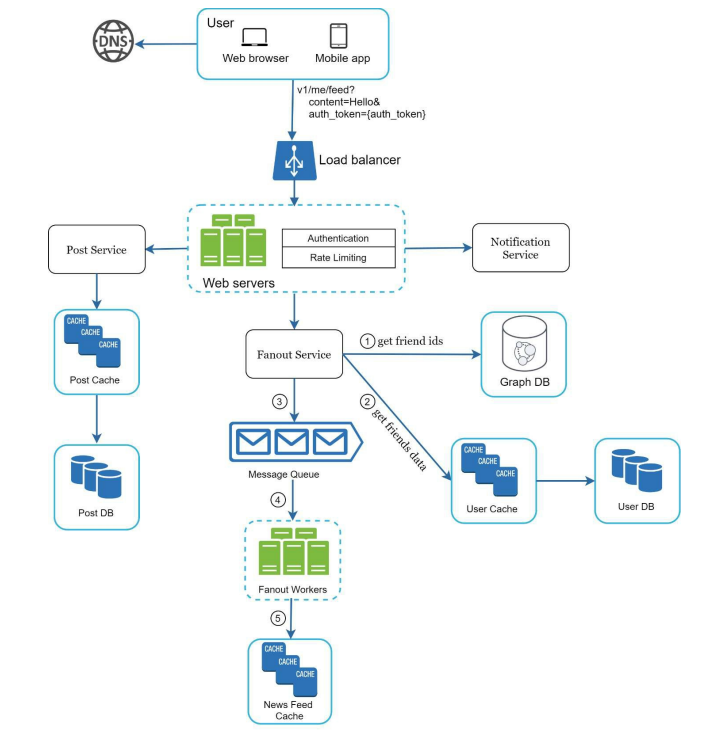
Web servers
- They enforce authentication and rate limiting.
- Rate limiting protects downstream services (Fanout Service, Notification Service, etc.) from spikes.
- It should also limit the number of posts a user can create within a time window.
Fanout Service (building feeds)
- The Fanout Service updates friends’ feeds when new posts arrive.
- It uses a graph database (or another graph representation) to store the follower/friend relationships as a directed graph. This makes it efficient to look up a user’s neighbors (followers/followees), traverse relationships, and support features like recommendations.
- After it gets the relevant user IDs, it fetches user settings (for example, muted users) and then schedules background work.
There are two common strategies to trigger fanout:
- **Fanout on write (push model):** - When a post is created, we proactively update the feeds for all followers. - **Pros:** near real-time updates; fast reads because feeds are pre-computed. - **Cons:** expensive for high-fanout users (celebrities). A single post may require updating millions of feeds.- **Fanout on read (pull model):** - We compute the feed when the user opens it. - **Example:** When George posts, we store the post but do not update anyone’s feed immediately. When Petar opens the feed, the service pulls posts from the accounts Petar follows, ranks/orders them, and returns the top N items (for example, the most recent 20). - **Pros:** cheaper writes and scalable for celebrities. - **Cons:** slower reads because the work happens at request time, so caching becomes critical.A practical approach is a hybrid:
- Use **fanout on write** for users with a small or moderate follower count.- Use **fanout on read** for celebrities or users with very large follower counts.Fanout service (more detail)
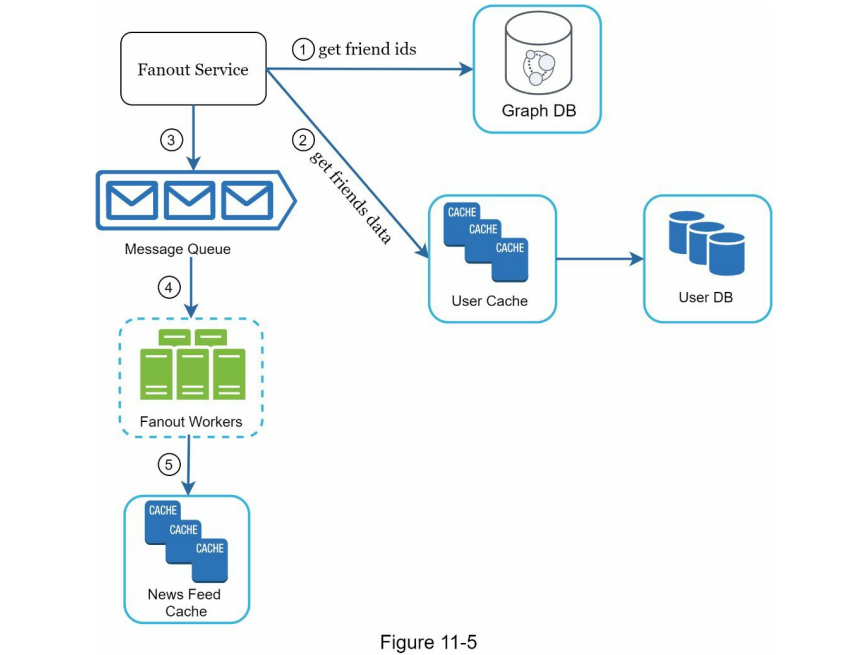
After triggering the Fanout Service:
- Read the IDs of users who should receive the new post (for example followers of the author).
- A graph database is useful here because relationships are naturally graph-shaped, and neighbor lookups (followers/followees) are a common query.
- Fetch user settings (for example, muted users, privacy settings, blocked users) from the User DB and filter accordingly.
- Enqueue a job into a message queue containing the user IDs and the new post ID.
- Workers poll the queue, process jobs, and update the News Feed Cache.
- Store only lightweight feed items (for example
{post_id, author_id, timestamp}) instead of full post bodies to reduce memory usage. - Cache entries should have a reasonable TTL and/or be invalidated on updates.
- Store only lightweight feed items (for example
Reading the news feed
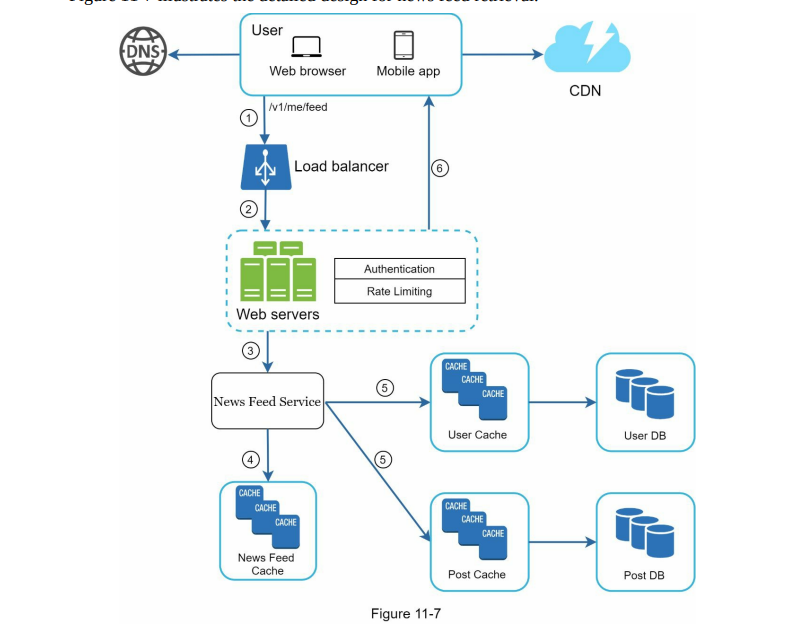
The flow is similar up to the web servers. For a read request:
- The News Feed Service reads the user’s feed from the News Feed Cache.
- The cache typically stores a list of post IDs (and sometimes author IDs and timestamps).
- Using those IDs, the service fetches:
- post content from the Post Service (or post storage/cache)
- user metadata from the User Service (or user cache)
- The service assembles the final feed response and returns it to the client.
Step 4: Wrap-up
If there is more time, we can go deeper into scalability topics:
- Scaling the database layer (vertical vs. horizontal scaling)
- Read replicas
- Primary-replica (master-slave) setups
- Caching strategy (cache-aside, TTLs, invalidation)
- Handling hot users (celebrities) and hot keys