System Design Interview Chapter 10
System Design Chapter 10: Design A Notification System
Notes from System Design Interview Chapter 10 on notification architecture, push systems, queues, providers, and reliability.
System Design Interview series: Chapter 10 - Design A Notification System Summarizing chapters
Notification formats
There are three types of notification formats:
- Mobile push notifications
- SMS notifications
- Email notifications
Step 1. Understand the problem and define the scope
Asking the following questions will help us establish the scope and remove ambiguities.
- What types of notifications do we need to support?
- Mobile push notifications, SMS notifications, and email notifications.
- Is the system real-time?
- It should be real-time. However, under high load, we can allow some delay.
- Which devices do we need to support?
- Android and iOS devices, and desktop/laptop.
- Who triggers the notification to be sent?
- Usually, the client application triggers it, but we should also support scheduling on the server side.
- Can users disable receiving notifications?
- Yes.
- How many notifications are sent out each day?
- 10 million mobile, 5 million email, 1 million SMS (from the book).
Step 2. Propose a high-level design and dive deep
Different types of notifications
iOS push notifications
Here, we need three components to send a notification to an iOS user.
- Provider: This component prepares notifications and sends them to the Apple Push Notification Service.
- Device token: A unique identifier used to send push notifications.
- Payload: A collection of data, usually in JSON, that is sent to the device.
Android push notifications
Mostly, Firebase Cloud Messaging is used to send notifications to Android devices.
SMS messaging
Mostly, a third-party service is used to handle this type of messaging, such as Twilio.
Similar to SMS messaging, third-party services can handle this end-to-end, such as SendGrid.
Contact info gathering flow
After explaining the different types of notifications, we need to look at the Contact Info Gathering Flow.
Because we have to identify the user who is going to subscribe to notifications, we need to store user information from sign-up so we can authenticate with the provider.
We might need two tables: one for user information and one for device information, because users may use multiple devices, and we need to know all of them to send notifications.
Initial sending flow
Let’s see how the sending/receiving part works, at least at the high-level design.
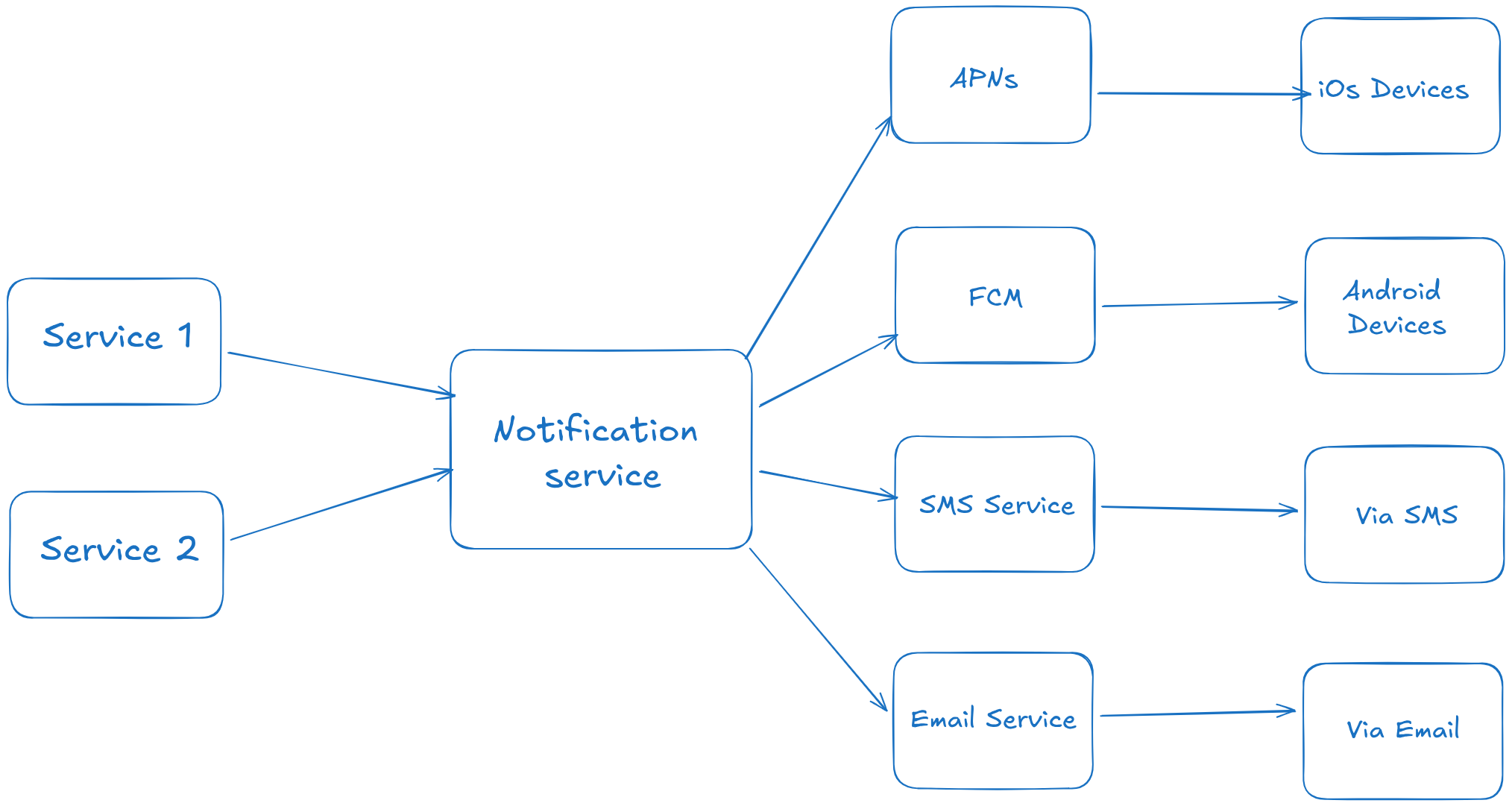
We have a basic notification service that is called by external services. The notification service holds user data, builds notifications, and sends the payload and device token to a third-party library, which handles the rest of the work.
The problems here are:
- Single point of failure: Since there is only one service, if it fails, the whole notification flow breaks. Also, storing the data within the service is not ideal.
- We cannot scale the service because we do not have the necessary components or decoupling.
- Performance won’t be great because the notification service might be responsible for generating an HTML template and populating it with user information before calling the third-party library.
Improved notification architecture
We can improve the system by moving the database and cache into separate services, introducing auto-scaling for the notification service, and establishing queues for each type of notification to decouple the system.
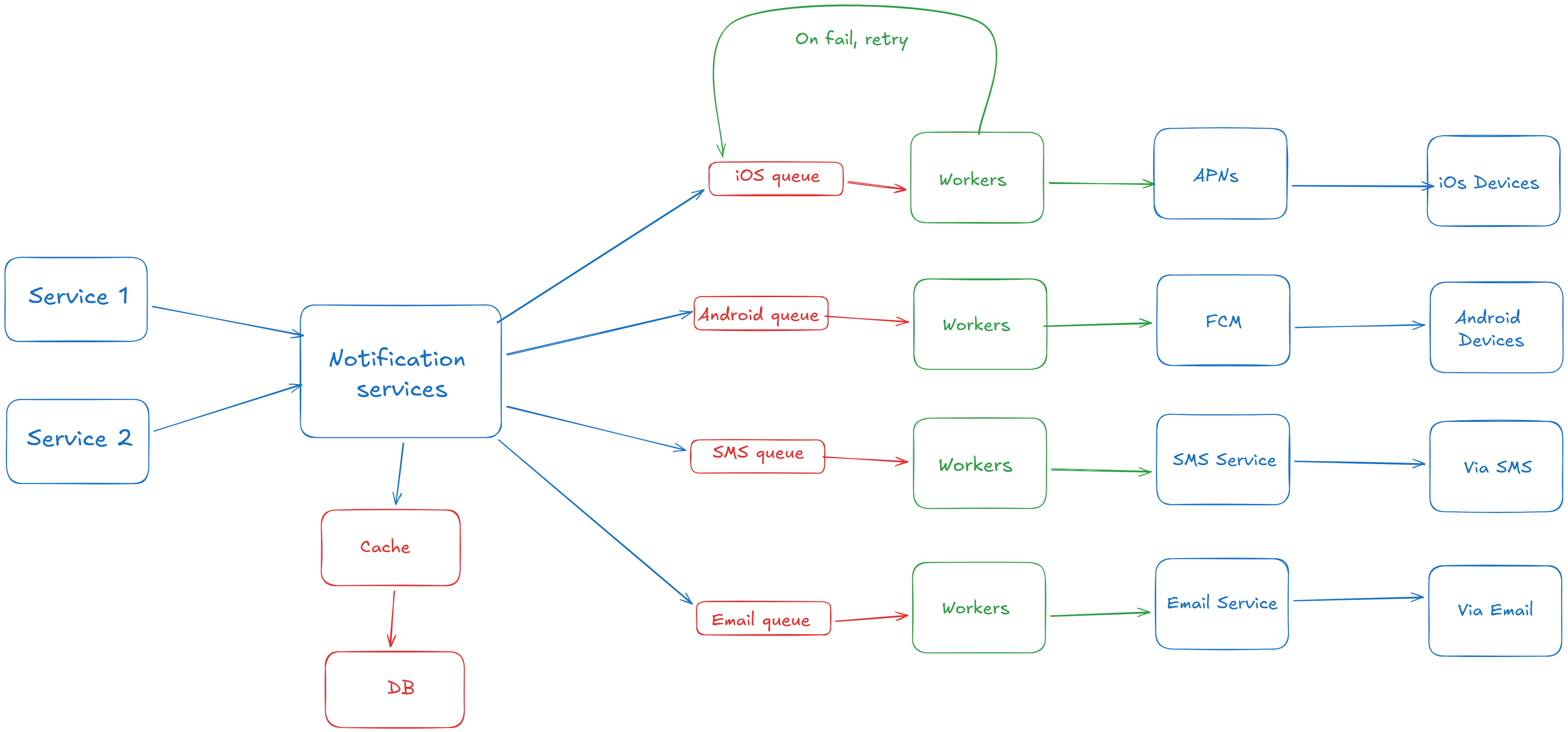
We have separated the database and cache from the notification service. This allows us to scale the notification service (NS) independently, since it becomes stateless.
- After a trigger happens, the NS tries to retrieve user information from the cache.
- If the cache is missed, we hit the database.
- After extracting the device token and payload, we send them as a job to message queues for each notification type.
- Workers poll from the message queues. They also handle template generation and prepare data to be sent to the third-party libraries.
Step 3: Design deep dive
We can enhance the system by increasing its reliability. We have to prevent data loss. One way to do this is by introducing a Notification Log that workers update. It serves as durable storage and helps prevent duplicate notifications.
A possible scenario is a retry that causes a notification to be sent more than once. To prevent this, workers can check the event ID before sending. If the event already exists in the Notification Log, they skip sending it to the third-party library.
Other important components, such as analytics tracking, notification templates, rate limiting, and notification settings, can be introduced to improve the design.
Notification templates
A notification template is a predefined structure that can be populated with data from the payload and styled. This results in more consistent notifications across users and saves time, since we do not have to generate templates on the fly.
Notification settings
To achieve more granularity, we can create another table in the database and store the device, an opt-in boolean field, and the type of notification. This allows users to disable notifications for specific devices. Before sending notifications, we have to check the opt-in field.
Rate limiting
Users may receive many notifications, so we should restrict notification volume by rate-limiting requests.
Monitoring
We should monitor the total number of queued notifications. If the number is too large, it means workers are not processing jobs fast enough, so we may need to scale horizontally.
Event tracking/analytics
This is important because tracking each step allows us to infer business-relevant information. For example, we can track how many users, after receiving a notification, clicked it or unsubscribed.
Authentication
We need to authenticate whether a notification can be sent, so an additional layer over the notification service is needed. Using an app key and secret, we can authenticate the sender who is requesting a notification to be sent.
Step 4: Wrap up
In this chapter, we designed a notification system that supports push notifications, SMS, and email. To scale and improve reliability, we decoupled notification generation from delivery using message queues and worker services.