Article
JavaScript Map Deep Dive: From API Usage to V8's OrderedHashMap
A deep dive into JavaScript Map behavior, insertion order, iterators, SameValueZero equality, LRU cache usage, and V8's OrderedHashMap implementation details.
Personal Intent
The goal of this article is to collect my understanding of JavaScript Map in one place: from the public API and everyday usage, through iterators and insertion order, and down into V8’s OrderedHashMap implementation.
This article grew out of my learning process with ChatGPT, specification text, V8 blog posts, and source-code snippets.
This is not original engine research; it is a structured study note that I can revisit later.
A practical motivation for this deep dive was understanding why Map works so well for patterns like an LRU cache. That example made me realize that knowing the API is not always enough; small details such as insertion order, iterators, SameValueZero, delete + set, and the difference between size and capacity can matter a lot when reasoning about correctness.
1. What Map is at a high level
At the JavaScript language level, a Map is an ordered key-value collection.
That sentence has several important parts:
- key-value: each entry has a key and a value.
- ordered: iteration happens in insertion order.
- collection: it is designed for dynamic storage, lookup, insertion, deletion, and iteration.
- arbitrary keys: keys can be primitives, objects, functions,
NaN, symbols, and so on.
A minimal example:
const map = new Map();
map.set("a", 1);map.set("b", 2);
console.log(map.get("a")); // 1console.log(map.size); // 2
At the practical level, I like this mental model:
Map = efficient key-value lookup + insertion-order iterationThat is already enough to explain why Map is useful for things like caches, grouping, frequency counters, deduplication with metadata, and preserving order while still looking up by key.
2. Core Map API
The core Map methods and properties are:
const map = new Map();
map.set(key, value);map.get(key);map.has(key);map.delete(key);map.clear();
map.size;
map.keys();map.values();map.entries();
map[Symbol.iterator]();
set(key, value)
Adds a new key-value pair or updates an existing key.
const map = new Map();
map.set("a", 1);map.set("a", 100);
console.log(map.get("a")); // 100
Important detail:
set() returns the map itself.That means chaining is possible:
const map = new Map().set("a", 1).set("b", 2);get(key)
Returns the value for a key, or undefined if the key is missing.
const map = new Map();
map.set("a", 1);
console.log(map.get("a")); // 1console.log(map.get("x")); // undefined
Important caveat: if a key exists and its value is actually undefined, get() alone cannot distinguish between “missing key” and “existing key with undefined value”.
const map = new Map();
map.set("a", undefined);
console.log(map.get("a")); // undefinedconsole.log(map.get("x")); // undefined
To distinguish those cases, use has().
has(key)
Returns a boolean indicating whether the key exists.
const map = new Map();
map.set("a", undefined);
console.log(map.has("a")); // trueconsole.log(map.has("x")); // false
delete(key)
Removes a key if it exists and returns a boolean:
const map = new Map();
map.set("a", 1);
console.log(map.delete("a")); // trueconsole.log(map.delete("a")); // false
clear()
Removes all entries:
const map = new Map([  ["a", 1],  ["b", 2]]);
map.clear();
console.log(map.size); // 0
size
size is the current number of live entries in the map:
const map = new Map();
console.log(map.size); // 0
map.set("a", 1);console.log(map.size); // 1
map.delete("a");console.log(map.size); // 0
This is important when building something like a cache:
capacity = maximum allowed number of entriessize = current number of live entriesThe cache’s capacity is a rule I define. map.size is the current state of the underlying storage.
3. Insertion order
A defining behavior of JavaScript Map is that it preserves insertion order.
const map = new Map();
map.set("a", 1);map.set("b", 2);map.set("c", 3);
console.log([...map.keys()]);// ["a", "b", "c"]
When iterating:
for (const [key, value] of map) { console.log(key, value);}the output is:
a 1b 2c 3MDN describes Map iteration as happening in insertion order, where that order corresponds to the order in which each key-value pair was first inserted by set() when the key was not already present.
This is not a small detail. It is part of the observable behavior of Map.
That means insertion order is not just a convenience; it is a semantic guarantee that application code can rely on.
4. Iterators: keys(), values(), entries()
Map gives iterator-producing methods:
map.keys();map.values();map.entries();For example:
const map = new Map([  ["a", 1],  ["b", 2]]);
const keys = map.keys();
console.log(keys.next());// { value: "a", done: false }
console.log(keys.next());// { value: "b", done: false }
console.log(keys.next());// { value: undefined, done: true }
The important correction is:
map.keys(); // iterator, not arraySo this is wrong:
const firstKey = map.keys()[0]; // wrongmap.keys() returns an iterator object. It is not indexable like an array.
Correct:
const firstKey = map.keys().next().value;This matters a lot in code like LRU cache eviction:
const leastRecentlyUsedKey = map.keys().next().value;That gives the first key in insertion order.
You can convert the iterator into an array:
const firstKey = [...map.keys()][0];but this creates an array of all keys. If all I need is the first key, that is unnecessary work.
So the practical rule is:
Need to loop all keys? Use for...of or spread.Need only the first key? Use map.keys().next().value.5. Updating existing keys does not move them
This is one of the most important Map details.
If I call set() for a key that already exists, the value is updated, but the key does not move to the end of insertion order.
const map = new Map();
map.set("a", 1);map.set("b", 2);map.set("a", 100);
console.log([...map.keys()]);// ["a", "b"]
The key "a" remains where it was originally inserted.
So this:
map.set(existingKey, newValue);means:
Update the existing value.Do not create a new insertion position.Do not refresh insertion order.If I want to move a key to the end, I need to delete it and insert it again:
const value = map.get("a");
map.delete("a");map.set("a", value);
console.log([...map.keys()]);// ["b", "a"]
This delete-then-set pattern is exactly what makes a Map useful for an LRU cache:
oldest key at the beginningnewest key at the endaccessed key is deleted and reinserted6. Key equality: SameValueZero
Map compares keys using SameValueZero.
The ECMAScript specification says that distinct Map key values are discriminated using the SameValueZero comparison algorithm.
For most primitive values, this behaves similarly to ===.
But one important difference is NaN:
const map = new Map();
map.set(NaN, "value");
console.log(map.get(NaN));// "value"
Even though:
console.log(NaN === NaN); // falseMap can still find the NaN key because SameValueZero treats NaN as equal to NaN.
For object keys, equality is by reference identity:
const a = { id: 1 };const b = { id: 1 };
const map = new Map();
map.set(a, "value");
console.log(map.get(a)); // "value"console.log(map.get(b)); // undefined
a and b look structurally identical, but they are different object references.
So the practical model is:
Primitive keys:  compared by SameValueZero value semantics
Object/function keys:  compared by reference identity
This is why Map can safely use objects as keys without stringifying them.
7. Map vs plain object
Both Map and objects can associate names/keys with values, but they are not the same tool.
Use an object when I am modeling structured data:
const user = { id: 1, name: "Petar", role: "engineer"};An object is a good fit when:
The keys are known property names.The shape is meaningful.I want to serialize to JSON.I am representing an entity or record.Use Map when I need a dynamic key-value collection:
const cache = new Map();
cache.set("user:1", userData);cache.set(someObject, computedValue);
A Map is a good fit when:
Keys are dynamic.Keys may be non-strings.I care about insertion order.I frequently add and delete entries.I need direct iteration.I need a reliable size property.I want to avoid prototype-key concerns.A compact rule:
Object = structured recordMap = dynamic key-value collection8. Practical use case: LRU cache with Map
A Least Recently Used cache has two basic rules:
When a key is accessed, it becomes recently used.When capacity is exceeded, remove the least recently used key.JavaScript Map helps because it gives:
Fast key lookupStable insertion orderDeletionReinsertionAccess to the first key via keys().next().valueThe mental model:
Beginning of Map = least recently usedEnd of Map = most recently usedWhen I access a key, I move it to the end:
const value = map.get(key);map.delete(key);map.set(key, value);When I need to evict:
const lruKey = map.keys().next().value;map.delete(lruKey);A clean implementation:
class LRUCache {  constructor(capacity) {    this.capacity = capacity;    this.data = new Map();  }
  _markAsRecentlyUsed(key, value) {    this.data.delete(key);    this.data.set(key, value);  }
  get(key) {    if (!this.data.has(key)) {      return -1;    }
    const value = this.data.get(key);    this._markAsRecentlyUsed(key, value);
    return value;  }
  put(key, value) {    if (this.data.has(key)) {      this._markAsRecentlyUsed(key, value);      return;    }
    if (this.data.size === this.capacity) {      const leastRecentlyUsedKey = this.data.keys().next().value;      this.data.delete(leastRecentlyUsedKey);    }
    this.data.set(key, value);  }}
Important details:
capacity is fixed.data.size tracks current entries.keys().next().value returns the first key in insertion order.set(existingKey, value) does not move the key.delete + set moves the key to the end.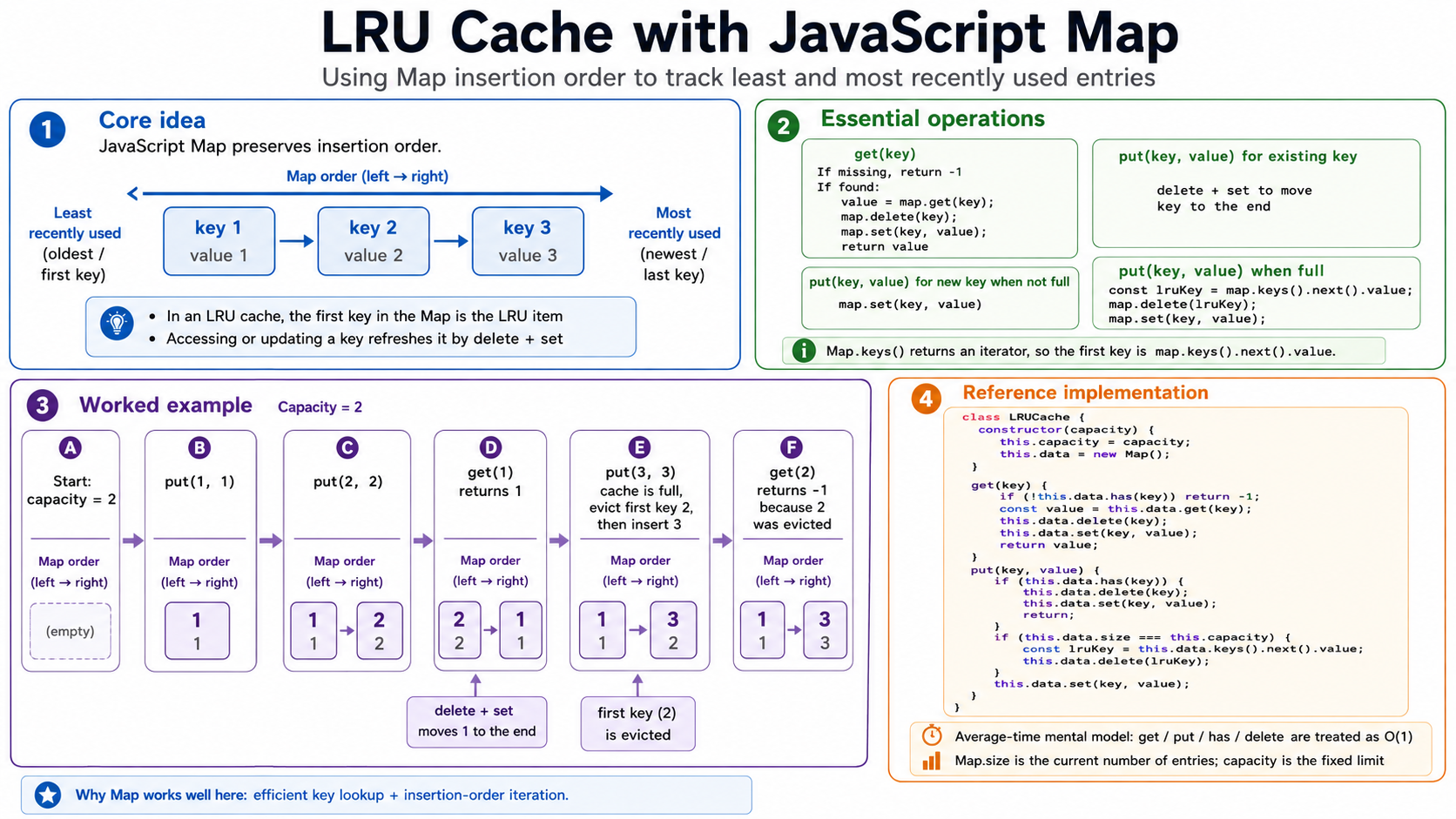
9. Specification guarantee vs engine implementation
At the ECMAScript specification level, Map is specified by observable behavior, not by a required memory layout.
In simple words: the specification tells us what Map must do, not exactly how an engine must store it in memory. It requires Map operations to be efficient on average, but it does not force every JavaScript engine to use the same internal data structure. The list-like structure shown in the spec is there to define behavior such as insertion order, key equality, and iteration semantics. It should not be read as “this is how Map is literally implemented inside the engine.”
This matters because saying:
Map is always a hash table.is too strong at the language-spec level.
A more accurate statement is:
The JavaScript spec requires Map to provide average sublinear access.Engines are free to implement that with hash tables, trees, or another structure.V8 implements Map using ordered hash table structures.MDN summarizes this similarly: the implementation could be a hash table, search tree, or another data structure, as long as average access is sublinear.
For algorithm discussions, it is usually acceptable to say:
Map get/set/has/delete are expected O(1) average time in modern engines.But the precise version is:
Spec guarantee: average sublinearV8 implementation: ordered hash tablePractical mental model: expected O(1) average10. V8 internals: OrderedHashMap
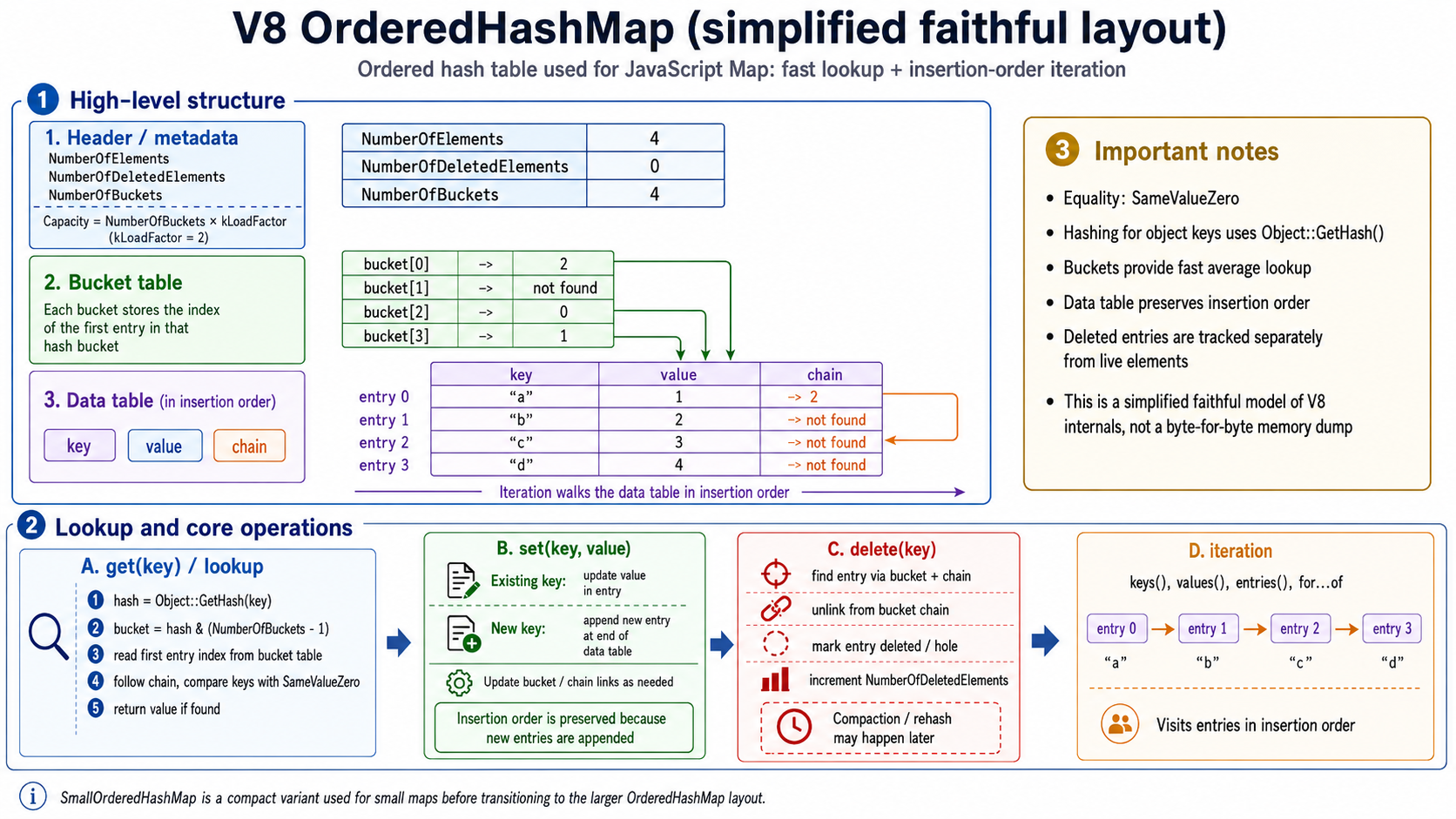
In V8, JavaScript Map is backed by an internal structure called OrderedHashMap, which is a specialization of OrderedHashTable.
The V8 source comments state that OrderedHashTable is a hash table with object keys that preserves insertion order. The same comments say it is meant to be used by JSMap and JSSet, with Object::SameValueZero() used for equality and Object::GetHash() used for hashing.
So the V8-level mental model is:
JS Map -> JSMap -> OrderedHashMap -> OrderedHashTableThe key idea:
V8 OrderedHashMap = hash lookup + insertion-order storageThat means it must solve two problems at once:
- Fast lookup by key.
- Stable iteration in insertion order.
A simple hash table alone does not necessarily preserve insertion order. A simple array of entries preserves order but does not give efficient lookup. OrderedHashMap combines both.
11. The internal layout: header, buckets, data table, entries, chains
V8’s OrderedHashTable source comment describes the memory layout as:
[0] : Prefix[kPrefixSize] : element count[kPrefixSize + 1] : deleted element count[kPrefixSize + 2] : bucket count[kPrefixSize + 3 ...] : hash table / bucket table[...] : data tableThe V8 source layout comments describe the bucket table as storing offsets into the data table where the first item for each bucket is stored.
A simplified model:
OrderedHashMap├── Header / metadata│ ├── NumberOfElements│ ├── NumberOfDeletedElements│ └── NumberOfBuckets│├── Bucket table│ ├── bucket[0] -> entry index│ ├── bucket[1] -> not found│ ├── bucket[2] -> entry index│ └── ...│└── Data table ├── entry 0: key, value, chain ├── entry 1: key, value, chain ├── entry 2: key, value, chain └── ...Header / metadata
The header tracks bookkeeping information:
NumberOfElements = live entriesNumberOfDeletedElements = deleted / hole entriesNumberOfBuckets = bucket countThis is important because deleting from an ordered table is not always the same as immediately compacting an array. V8 can track deleted entries separately.
Bucket table
A bucket is a slot selected by the hash of the key.
A simplified bucket table:
bucket[0] -> entry 2bucket[1] -> not foundbucket[2] -> entry 0bucket[3] -> entry 1The bucket table does not store the key-value pairs directly. It stores indexes into the data table.
So:
bucket[2] -> entry 0means:
The first entry in bucket 2 is data-table entry 0.Data table
The data table stores entries in insertion order.
Example:
entry 0: key "a", value 1, chain -> 2entry 1: key "b", value 2, chain -> not foundentry 2: key "c", value 3, chain -> not foundentry 3: key "d", value 4, chain -> not foundFor OrderedHashMap, each entry conceptually contains:
keyvaluechainV8’s source exposes kValueOffset = 1 for OrderedHashMap, and the base table includes a chain offset as part of the entry layout.
Chains
A chain connects entries that belong to the same hash bucket.
If two keys hash to the same bucket, the bucket points to one entry, and that entry can point to another entry in the same bucket.
Example:
bucket[2] -> entry 0
entry 0: key "a", value 1, chain -> entry 2entry 2: key "c", value 3, chain -> not found
This means both "a" and "c" are in bucket 2.
Lookup walks:
bucket[2] -> entry 0 -> entry 2 -> chain endsThe V8 implementation code walks this chain using HashToEntryRaw(hash) and NextChainEntryRaw(raw_entry) when finding entries.
Capacity and load factor
The V8 source contains a kLoadFactor value of 2, and capacity is derived from bucket count multiplied by that load factor in the small ordered hash table code.
A useful conceptual model:
NumberOfBuckets = number of hash bucketsCapacity = how many entries can fit before growth/rehash pressureLoad factor = relationship between buckets and entry capacityThis does not mean we should rely on exact internal numbers in application code. These are implementation details and can change. The important idea is that V8 balances bucket count, capacity, deleted entries, and rehashing to keep operations efficient.
12. How get(key) works under the hood
At the JavaScript level:
map.get(key);returns the value for the key, or undefined if the key is missing.
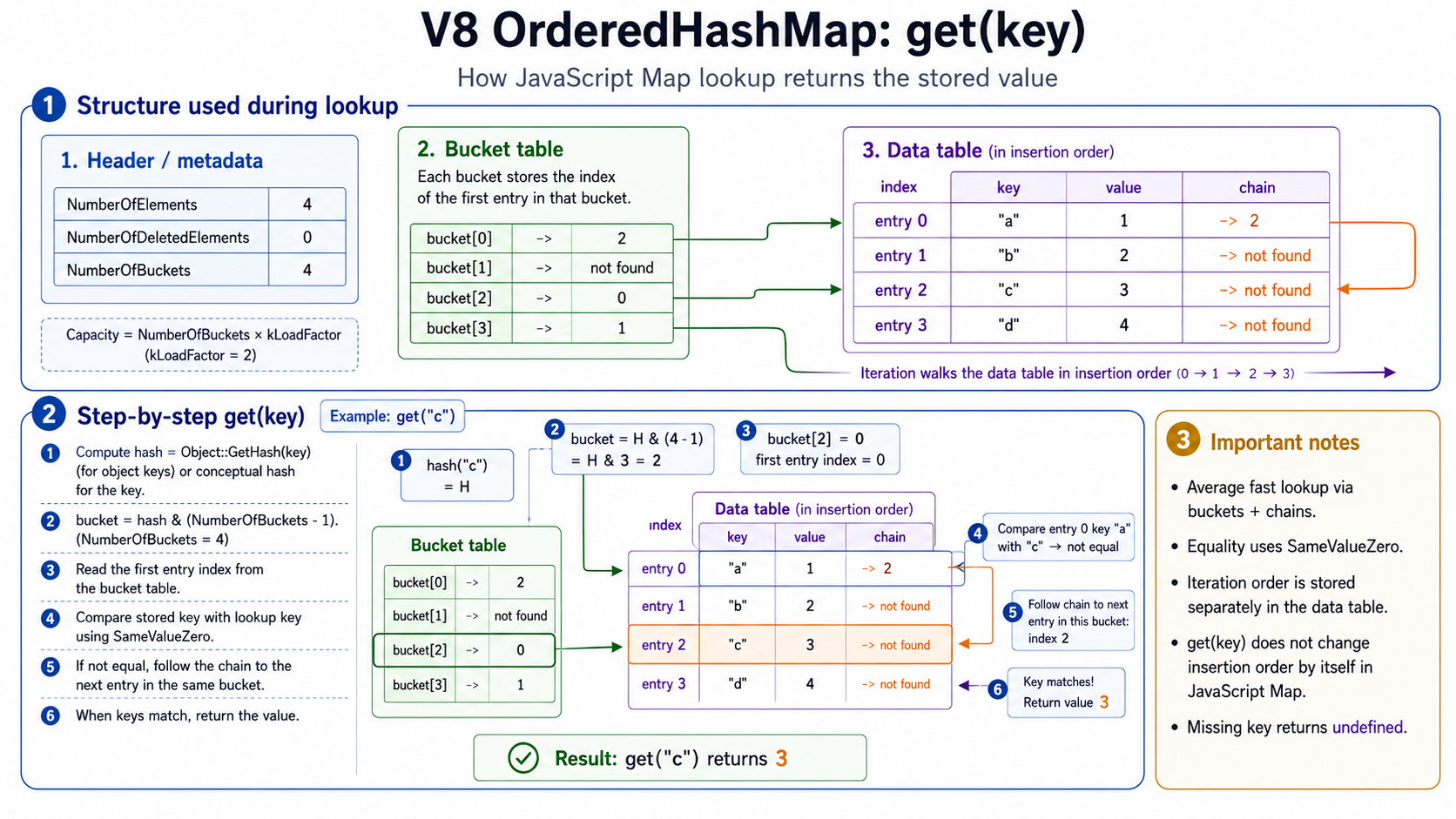
Under the V8 OrderedHashMap mental model, lookup is roughly:
1. Compute or retrieve the key hash.2. Convert the hash to a bucket index.3. Read the first entry index from the bucket table.4. Compare the stored key with the lookup key using SameValueZero.5. If the key matches, return the value.6. If the key does not match, follow the chain to the next entry.7. Repeat until a match is found or the chain ends.8. If the chain ends, return undefined.The V8 source for finding an entry checks whether the table is empty, obtains the hash with Object::GetHash(key), returns not found if there is no identity hash, then walks the bucket chain with HashToEntryRaw(...) and NextChainEntryRaw(...). During that walk, it compares candidate keys with Object::SameValueZero(candidate_key, key).
Conceptually:
get("c")
hash("c")  -> bucket index 2  -> bucket[2] = entry 0  -> entry 0 key is "a", not "c"  -> follow chain to entry 2  -> entry 2 key is "c"  -> return value 3
Important behavior:
get(key) does not change insertion order.This is why an LRU implementation must explicitly do:
const value = map.get(key);map.delete(key);map.set(key, value);get() alone only reads. It does not refresh recency.
13. How has(key) works under the hood
At the JavaScript level:
map.has(key);returns true or false.
Under the hood, has() uses the same basic lookup path as get():
1. Compute or retrieve the key hash.2. Locate the bucket.3. Read the first entry index from the bucket table.4. Traverse the chain if necessary.5. Compare keys using SameValueZero.6. Return true if a matching key is found.7. Return false if no matching key is found.The difference is the result:
get(key) -> stored value or undefinedhas(key) -> booleanV8’s HasKey implementation calls FindEntry(...) and checks whether the entry is found.
So I can think of has() as:
Run the lookup algorithm.Ignore the stored value.Only answer whether the key exists.Important behavior:
has(key) does not mutate the map.has(key) does not affect insertion order.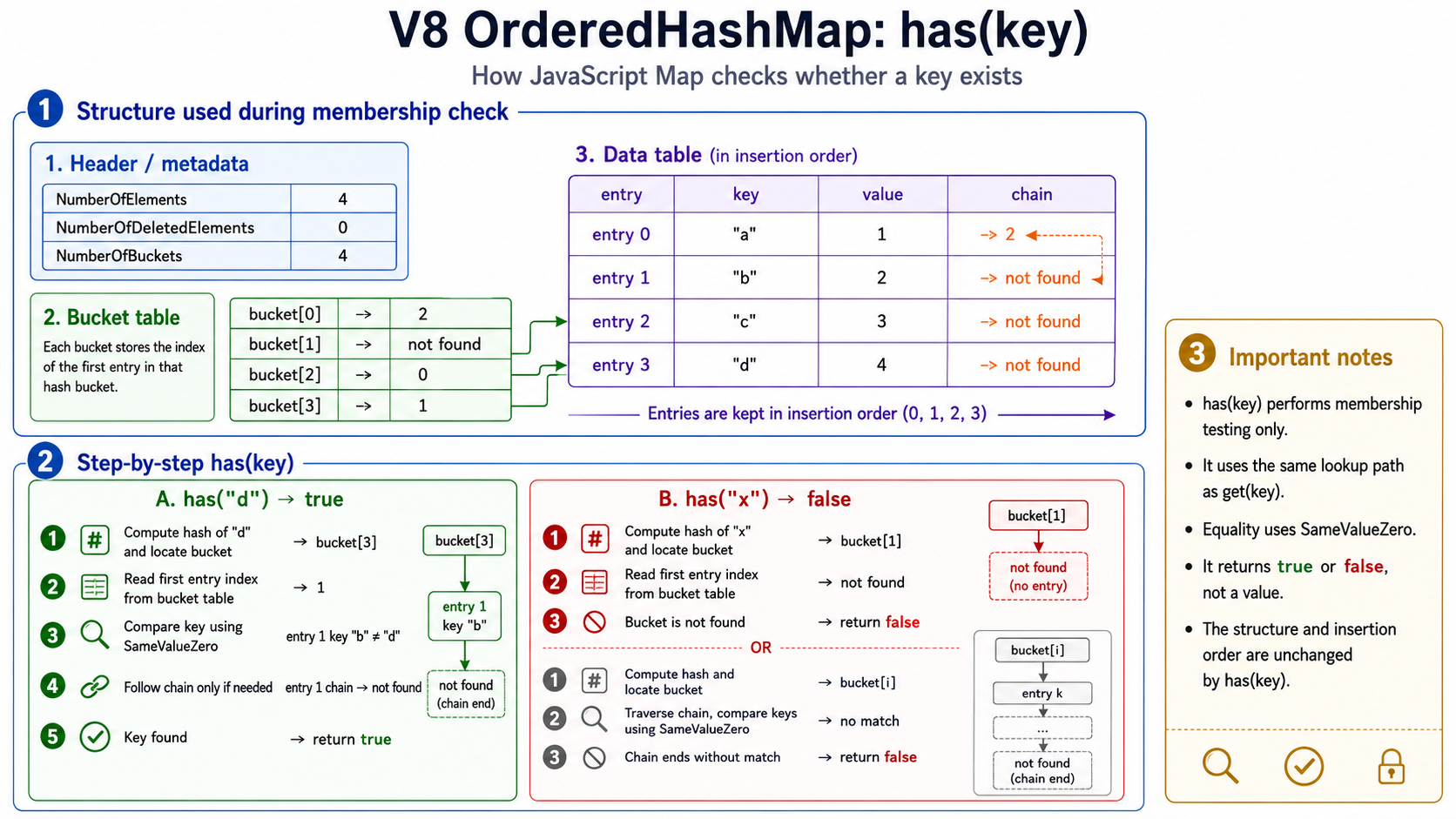
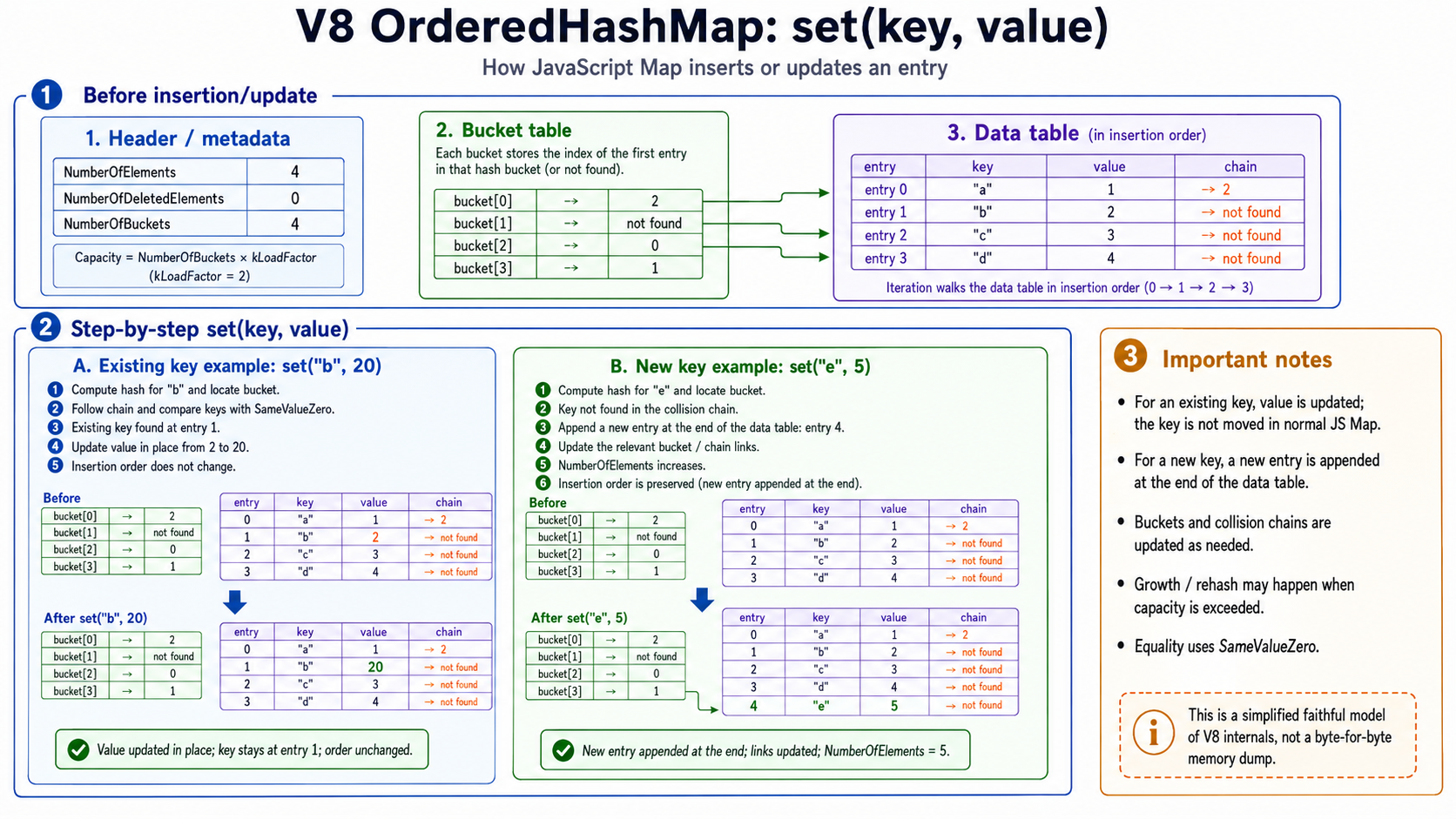
14. How set(key, value) works under the hood
At the JavaScript level:
map.set(key, value);either inserts a new entry or updates an existing entry.
There are two cases.
Case A: existing key
If the key already exists:
1. Compute or retrieve the key hash.2. Locate the bucket.3. Traverse the bucket chain.4. Compare keys using SameValueZero.5. Find the existing entry.6. Update the value in that entry.7. Keep insertion order unchanged.Public behavior example:
const map = new Map();
map.set("a", 1);map.set("b", 2);map.set("a", 100);
console.log([...map.keys()]);// ["a", "b"]
The key "a" is not moved.
This matters because Map#set() does not mean “mark as recently used”. It only means “insert if missing or update if present”.
Case B: new key
If the key does not exist:
1. Compute or create the key hash.2. Locate the bucket.3. Traverse the chain to confirm the key is absent.4. Ensure there is enough capacity.5. Append a new entry at the end of the data table.6. Store key and value in the new entry.7. Set the new entry’s chain to the previous first entry in that bucket.8. Point the bucket to the new entry.9. Increment NumberOfElements.The V8 source for adding to an OrderedHashMap walks the existing chain and returns if the key already exists using SameValueZero; then it ensures capacity, reads the bucket and previous entry, computes the new entry index as NumberOfElements + NumberOfDeletedElements, writes the key, value, and chain, points the bucket to the new entry, and updates bookkeeping.
That is a dense implementation detail, but the mental model is simple:
new key -> append new data-table entryexisting key -> update existing entryFor LRU, this distinction is crucial.
If I want to refresh recency:
map.set(key, newValue); // not enough if key already existsI need:
map.delete(key);map.set(key, newValue);because deletion removes the old insertion position and setting inserts the key at the end.
15. How delete(key) works under the hood
At the JavaScript level:
map.delete(key);returns:
true if the key existed and was removedfalse if the key was missingUnder the hood, deletion is roughly:
1. Compute or retrieve the key hash.2. Locate the bucket.3. Read the first entry index from the bucket table.4. Traverse the chain.5. Compare keys using SameValueZero.6. If the key is not found, return false.7. If the key is found, unlink/update the bucket-chain structure.8. Mark the data-table entry as deleted / hole.9. Decrement NumberOfElements.10. Increment NumberOfDeletedElements.11. Return true.The V8 source deletion path shows deletion finding the entry first, returning false if not found, then updating element/deleted-element counts after deletion. The ordered-hash-table.h layout comments also describe explicit fields for live element count and deleted element count in the table layout.
The important conceptual point:
delete(key) does not necessarily compact the entire data table immediately.Why not?
Because the data table is also responsible for insertion-order iteration. If the implementation physically shifted entries every time something was deleted, it would complicate active iterators and internal entry references. Instead, the table can mark entries as deleted/hole and later compact or rehash when appropriate.
So deletion is best understood as:
Remove from lookup structure.Mark the data-table slot as deleted.Update bookkeeping.Possibly compact/rehash later.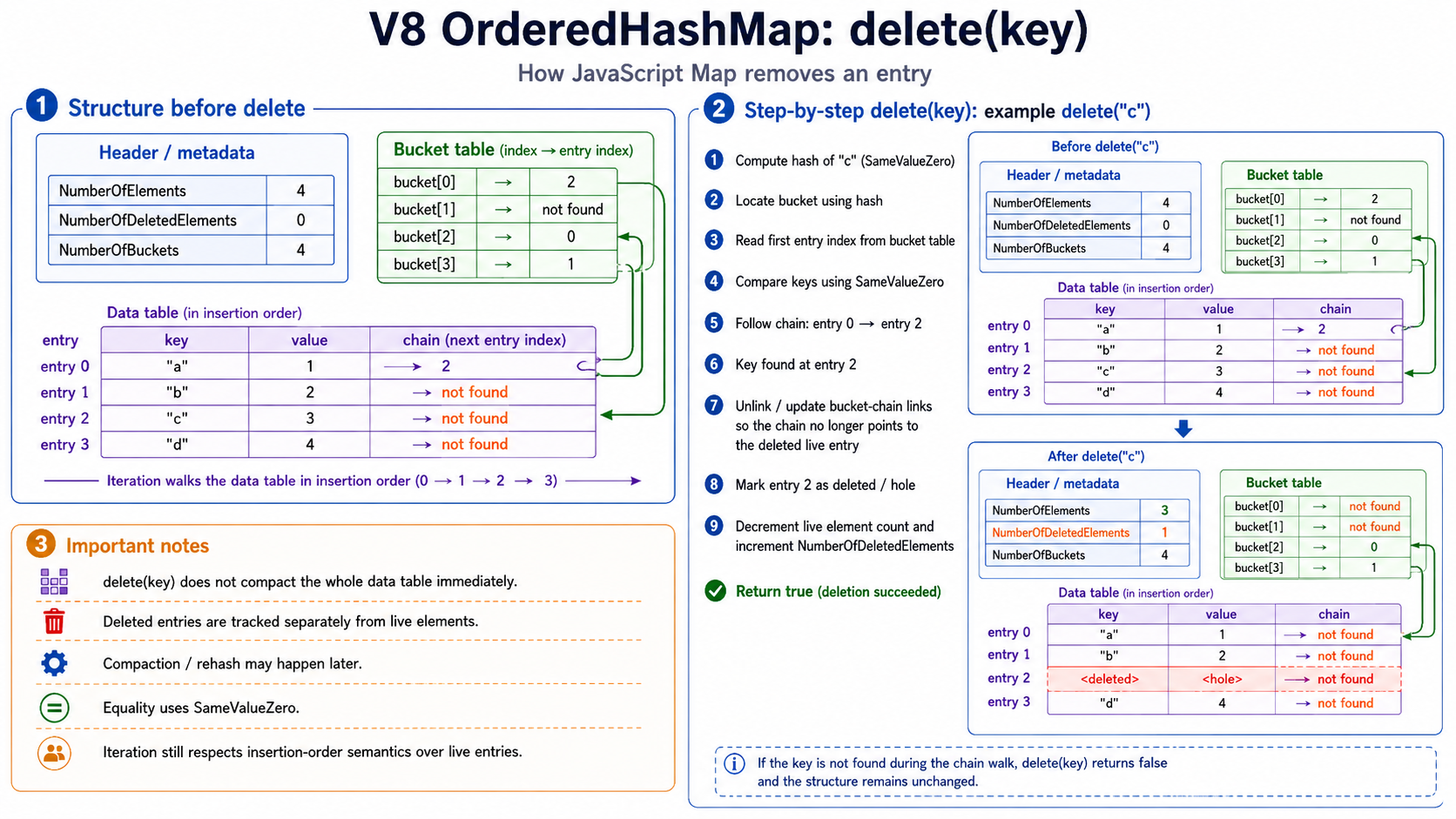
16. Iteration under the hood
At the JavaScript level:
for (const [key, value] of map) { console.log(key, value);}visits entries in insertion order.
Internally, this should not be imagined as scanning buckets.
Buckets are organized by hash, and hash order is not insertion order.
Instead:
Lookup uses the bucket table.Iteration walks the data table.The data table stores entries in insertion order:
entry 0entry 1entry 2entry 3...So iteration is conceptually:
walk entry 0walk entry 1walk entry 2skip deleted entries if neededcontinueThis is the central design idea of OrderedHashMap:
Bucket table = efficient lookupData table = insertion-order iterationChains = collision handlingThat is why V8 can provide both expected fast lookup and stable ordered iteration.
17. Small ordered hash tables in V8
V8 also has compact small ordered hash table variants, including SmallOrderedHashMap.
The V8 source comments describe SmallOrderedHashTable as similar to OrderedHashTable, but with a different memory layout where bucket and chain values are bytes instead of Smis. It has a max capacity of 254 and transitions to OrderedHashTable beyond that limit.
The source comment describes the small layout as:
[ Prefix ] [ Header ] [ Padding ] [ DataTable ] [ HashTable ] [ Chains ]This is an optimization detail. The public JavaScript behavior remains the same.
The useful mental model:
Small maps may use a compact representation.Larger maps use the full ordered hash table representation.Both preserve the same JavaScript Map semantics.18. Object keys and identity hash codes
When we use an object as a key:
const obj = {};const map = new Map();
map.set(obj, "value");
the engine needs a way to map that object key to a bucket.
For object keys, V8 uses an identity hash. The V8 blog explains that in V8, the hash code is a random number independent of the object value, so it cannot simply be recomputed from the object’s contents and must be stored somewhere.
This matches JavaScript semantics:
const a = { id: 1 };const b = { id: 1 };
const map = new Map();
map.set(a, "value");
console.log(map.get(a)); // "value"console.log(map.get(b)); // undefined
The hash is about identity, not structural equality.
A good distinction:
Object identity hash:  helps answer “which bucket should this object key go into?”
OrderedHashMap layout:  answers “where are buckets, entries, values, and chains stored?”
These are related but separate.
The object’s hash code is used by the hash table. But the storage strategy for that hash code is not the same thing as the layout of the OrderedHashMap.
19. Elements vs properties backing stores
This section exists because it is easy to mix two different V8 topics:
- The internal layout of
Map/OrderedHashMap. - The internal representation of ordinary JavaScript objects used as keys.
V8’s blog explains that a JavaScript object (JSObject) has pointers to an elements backing store and a properties backing store.
The distinction is:
elements backing store:  array-index-like properties
properties backing store:  string/symbol-named properties
Example from the V8 blog:
const x = {};x[1] = "bar"; // stored in elementsx["foo"] = "bar"; // stored in propertiesV8 Map uses OrderedHashMap internally, but object keys add one more detail: they may need identity hash codes. Those hash codes belong to the object key, not to the OrderedHashMap table layout itself.
For object-key hashing, V8 wanted to store the object’s hash code without adding a full extra word to every object. The V8 blog describes a few storage cases:
- If the properties backing store is empty, V8 can store the hash code directly on the
JSObject. - If the properties backing store is an array, V8 can use unused bits in the array length field.
- If the properties backing store is a dictionary, V8 reserves an extra word in the dictionary.
The 1022-value detail belongs to the array-backed properties case: because that array has an upper limit of 1022 values, only 10 bits are needed for the length, leaving unused bits in the Smi length field where V8 can store the hash code.
20. Complexity and practical implications
At the practical level:
map.get(key) expected O(1) averagemap.set(key) expected O(1) averagemap.has(key) expected O(1) averagemap.delete(key) expected O(1) averageiteration O(n)The precise caveat:
ECMAScript requires average sublinear access, not a particular hash-table layout.V8 implements Map using ordered hash table structures.Hash collisions, growth, deletion bookkeeping, and rehashing exist.For most application and interview-level reasoning, treating Map operations as expected O(1) is appropriate.
Practical use cases
Map is useful for:
CachesLRU cacheFrequency countersGrouping dataDeduplication with metadataGraph adjacency listsMemoizationObject-keyed metadataMaintaining insertion order while supporting lookupExamples:
Frequency counter
const counts = new Map();
for (const item of items) {  counts.set(item, (counts.get(item) ?? 0) + 1);}
Grouping
const groups = new Map();
for (const user of users) {  const role = user.role;
  if (!groups.has(role)) {    groups.set(role, []);  }
  groups.get(role).push(user);}
Memoization with object keys
const cache = new Map();
function computeForConfig(config) {  if (cache.has(config)) {    return cache.get(config);  }
  const result = expensiveComputation(config);  cache.set(config, result);  return result;}
This works because object keys are compared by identity.
21. Final mental model
JavaScript Map is an ordered key-value collection.At the language level:
Map preserves insertion order.Map accepts arbitrary key types.Map compares keys with SameValueZero.Map exposes get, set, has, delete, size, and iterators.map.keys() returns an iterator, not an array.set(existingKey, value) updates but does not move the key.delete + set moves a key to the end.At the V8 level:
JS Map is backed by OrderedHashMap.OrderedHashMap is an ordered hash table.It combines: bucket table -> lookup data table -> insertion-order iteration chains -> collision handlingThe clean internal picture:
hash(key) -> bucket index -> bucket table entry -> data table entry -> chain if collision -> SameValueZero comparisonFinally:
Map looks simple at the API level, but under the hood V8 uses an ordered hash table.
Buckets make lookup efficient. The data table preserves insertion order. Chains handle collisions. Deleted entries can be tracked separately. SameValueZero defines key equality. Object keys use identity, not structural equality.
References
- MDN, “Map - JavaScript”: describes
Mapas a key-value collection whose iteration happens in insertion order and lists iterator methods. - V8 source,
ordered-hash-table.h: comments describe the memory layout,OrderedHashMapvalue offset, load factor, and small ordered hash table behavior. - V8 source,
ordered-hash-table.cc: implementation details for finding, checking, adding, and deleting ordered hash table entries. - V8 blog, “Optimizing hash tables: hiding the hash code”: explains V8 object hash codes, object backing stores, and the 1022-value properties backing store detail.