Article
Apache Kafka Fundamentals: Producers, Brokers, Topics, Partitions, and Consumers
Summary of conversation with GPT about Apache Kafka's core concepts, including producers, brokers, topics, partitions, messages, consumers, replication, partitioning, ZooKeeper, and KRaft.
Personal Intent
This article is based on a personal conversation with GPT where I talked through the concepts, asked follow-up questions, and tried to summarize the mental model in my own words.
The goal of this article is not to go deep into every Kafka feature. I want to preserve a clear mental model of the main Kafka building blocks: producers, brokers, topics, partitions, messages, consumers, replication, partitioning, ZooKeeper, and KRaft.
Introduction
At a high level, Kafka is commonly used for moving streams of events or messages between applications in a scalable and durable way. Instead of one application directly calling another application every time something happens, Kafka can act as the middle layer where events are written, stored, and later read by other applications.
This article focuses on the main Kafka building blocks:
- Producers
- Brokers and clusters
- Topics
- Partitions and segments
- Messages
- Consumers
- Replication
- Partitioning
- ZooKeeper and KRaft at a high level
The Big Picture
The basic Kafka flow can be imagined like this:
Producer → Kafka Cluster / Brokers → Topic / Partitions → ConsumerA producer writes messages into Kafka. Kafka stores those messages in topics. Topics are split into partitions, and those partitions are stored on broker disks. Consumers then read messages from Kafka when they are ready.
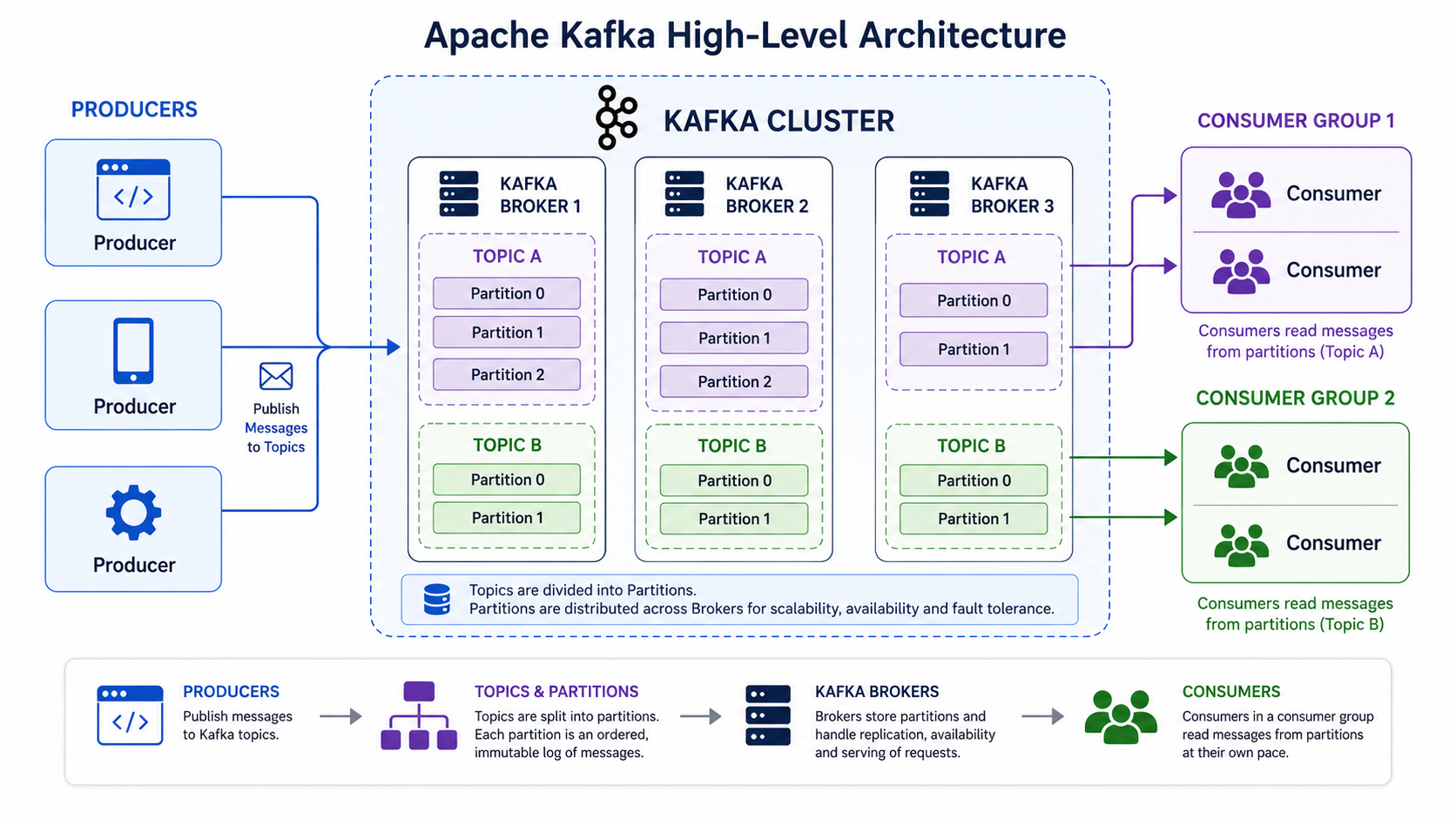
This is simple mental model keep in mind:
- Producers write data.
- Kafka brokers store data.
- Topics organize data.
- Partitions make topics scalable.
- Consumers read data.
Producers
A producer is an application or program that we write to send messages to Kafka.
For example, a producer could be:
- A web application sending user activity events
- A payment service sending payment events
- A logging service sending application logs
- An IoT system sending device measurements
The important point is that producers do not send data directly to consumers. Instead, producers write messages to Kafka topics.
A producer appends messages to a topic. One producer can write to one or more topics, and many producers can write to the same topic.
So the producer-to-topic relationship can be many-to-many:
- One producer can write to many topics.
- Many producers can write to one topic.
- Many producers can write to many topics.
Kafka Brokers and Kafka Cluster
Kafka brokers are the servers or processes that make up a Kafka cluster.
Each broker:
- Runs a Kafka process
- Has access to disk
- Receives and stores messages
- Communicates with other brokers over the network
- Manages one or more partitions
A Kafka cluster is a group of brokers working together as one system.
For example, I can imagine a Kafka cluster as a team of storage servers. Each broker stores part of the data, and together the brokers provide a distributed place for producers to write messages and consumers to read messages.
A Kafka cluster can have many brokers. This matters because topics and partitions can be spread across multiple brokers, which helps Kafka scale.
Consumers
A consumer is an application or program that I write to read messages from Kafka.
Consumers pull messages from one or more topics. This means the consumer decides when to read data, instead of Kafka pushing data into the consumer automatically.
A consumer might be:
- A reporting service reading order events
- A notification service reading signup events
- A monitoring tool reading log events
- A data processor reading raw events and producing cleaned events
A consumer can also become a producer. For example, an application may read messages from one topic, transform the data, and write the transformed messages into another Kafka topic.
Topic A → Consumer / Processor → Topic BAt a high level, this means Kafka can be used to connect multiple applications through streams of events.
Decoupling Producers and Consumers
One of the most important Kafka ideas is that producers and consumers are decoupled.
This means producers and consumers do not need to know about each other directly. A producer only needs to know where to write data in Kafka. A consumer only needs to know where to read data from Kafka.
This is useful because:
- Producers and consumers do not need to communicate directly.
- Slow consumers do not block producers.
- Consumers can be added without changing producers.
- Consumer failure does not necessarily stop producers.
- Producers and consumers can scale independently.
For example, if a producer is writing events quickly but one consumer is slow, the producer can continue writing to Kafka. The slow consumer can continue reading at its own pace, assuming the data is still available according to Kafka’s retention policy.
This makes Kafka useful as a buffer between systems. Producers can focus on writing events, and consumers can focus on processing them.
Topics
A topic is a logical collection of related messages or events.
I think of it as a named stream of events. For example:
orderspaymentsuser-signupsapplication-logsTopics are logical representations used to categorize messages. Developers define topics based on the kind of data they want to organize.
At a high level, a topic can be imagined as an append-only log. Producers append messages to the topic, and consumers read messages from the topic.
Important topic ideas:
- Kafka can have many topics.
- A topic contains related messages or events.
- Producers write messages to topics.
- Consumers read messages from topics.
- One or many producers can write to one or more topics.
- One or many consumers can read from one or more topics.
A topic is not usually just one single file or one single stream internally. To scale, Kafka splits topics into partitions.
Topics, Partitions, and Segments
Topics are split into partitions to allow scaling.
A partition is a log. More specifically, each partition is an ordered sequence of messages. Kafka guarantees strict ordering within a single partition.
That distinction is important:
- Ordering is guaranteed within a partition.
- Ordering is not necessarily guaranteed across the entire topic when the topic has multiple partitions.
For example, if a topic has three partitions, each partition has its own order:
Topic: orders
Partition 0: message 0 → message 1 → message 2Partition 1: message 0 → message 1 → message 2Partition 2: message 0 → message 1 → message 2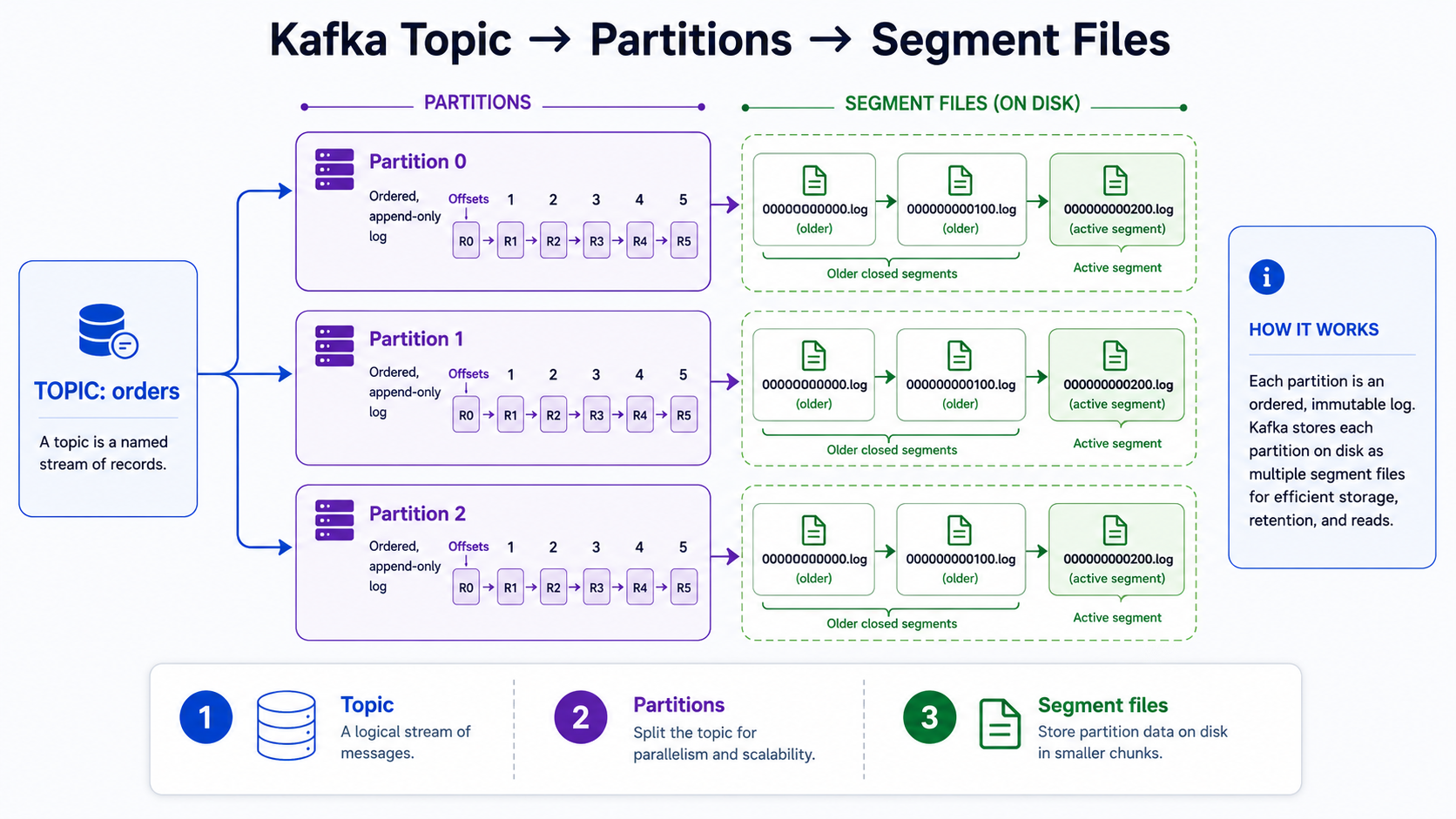
Partitions are stored durably on broker disks. A topic’s partitions can live on different brokers, which allows Kafka to spread data across the cluster.
Partitions are also split into segments. Segments are individual files on disk. So, at a simple storage level:
Topic → Partitions → Segment files on diskSegments are an implementation detail, but they are useful to know about because they explain how Kafka stores partition data on disk in smaller files instead of one endless file.
Kafka Messages
Kafka messages are also commonly called events or records.
A Kafka message usually contains:
- A key
- A value
- A timestamp
- Metadata
The value is the main data being sent. It can be serialized data such as JSON, Avro, Protobuf, or another format.
For example, a simple order event might conceptually look like this:
Key: order-123Value: { "orderId": "order-123", "amount": 49.99, "status": "created" }Timestamp: 2026-06-10T10:15:00ZMessages inside a partition are identified by offsets.
An offset is the position of a message inside a partition. For example:
Partition 0:Offset 0 → message AOffset 1 → message BOffset 2 → message COffsets matter because consumers use them to track how far they have read in each partition.
Brokers Managing Partitions
Brokers receive and store messages. Each broker can manage multiple partitions.
A topic’s messages are spread across partitions, and those partitions are spread across brokers. Each partition is stored on a broker’s disk, usually as one or more log segment files.
For example:
Broker 1 stores: orders partition 0, payments partition 1Broker 2 stores: orders partition 1, logs partition 0Broker 3 stores: orders partition 2, payments partition 0This distribution helps Kafka scale because data and work can be spread across multiple brokers.
Kafka also uses configurable retention policies. Retention controls how long Kafka keeps data, or how much data Kafka keeps, depending on the configured policy. At a high level, this means Kafka does not have to store messages forever.
Broker Replication
Kafka can store partition replicas on multiple brokers.
Replication provides fault tolerance. If one broker fails, another broker may still have a copy of the partition data.
Kafka replication uses a leader-follower model:
- One replica is the leader.
- Other replicas are followers.
- Producers and consumers interact with the leader replica.
- Followers replicate data from the leader.
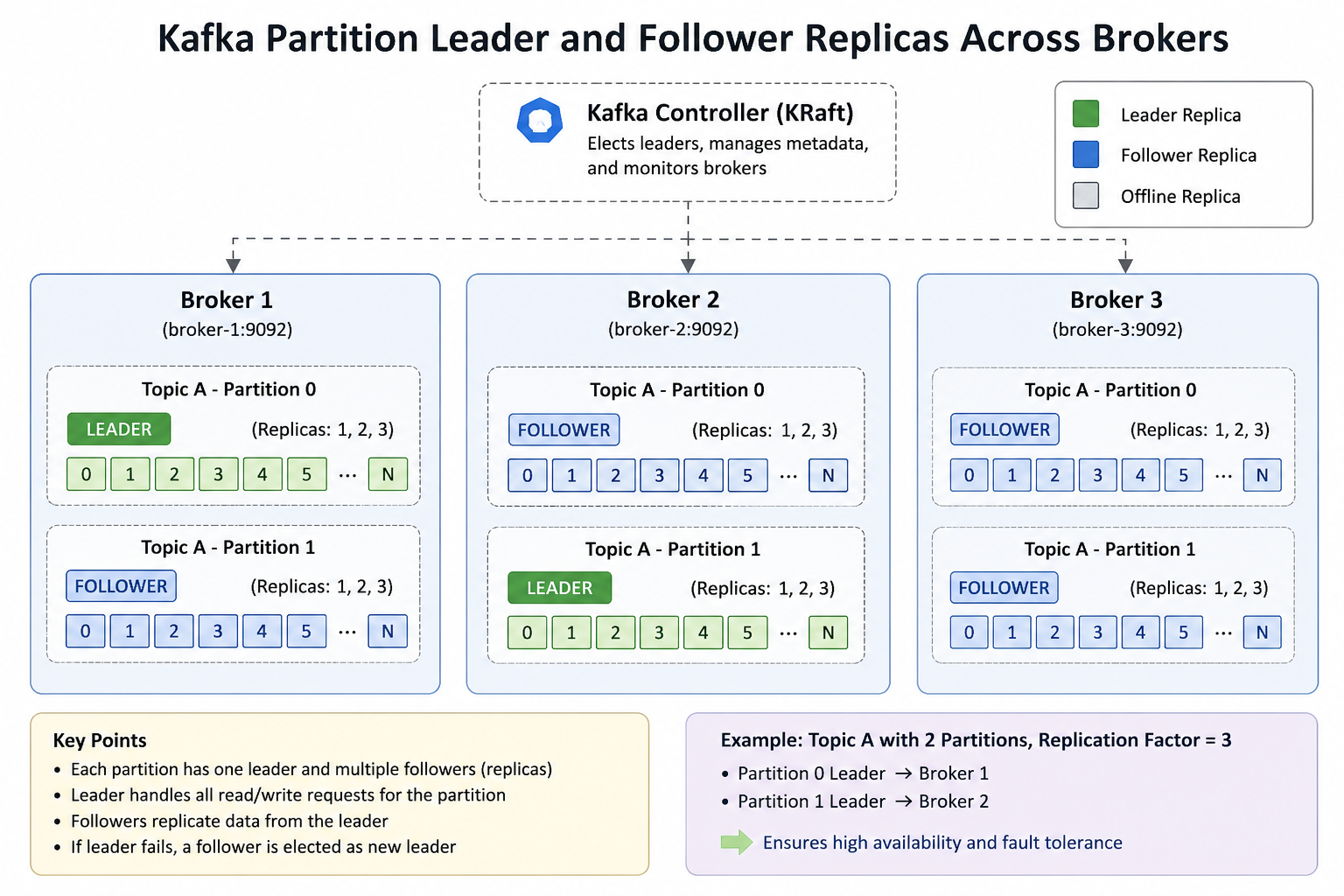
For example, if orders partition 0 has three replicas, they may be stored across three brokers:
orders partition 0
Broker 1: leader replicaBroker 2: follower replicaBroker 3: follower replica
This way, the partition is not stored on only one broker. Kafka can keep additional copies to improve availability and durability.
Load Balancing and Semantic Partitioning
When a producer sends a message to a topic, the message needs to go to one of the topic’s partitions.
Producers use a partitioning strategy to assign messages to partitions.
Partitioning helps with two main goals:
- Load balancing
- Semantic partitioning
Load balancing means spreading messages across partitions so work can be distributed.
Semantic partitioning means putting related messages in the same partition. This is useful because ordering is guaranteed within a partition.
When messages have keys, a common mental model is:
hash(key) % number_of_partitionsFor example, if the key is a customer ID, messages for the same customer can go to the same partition. This helps preserve the order of events for that customer within that partition.
Without keys, messages may be distributed across partitions for load balancing, for example in a round-robin-style pattern.
Kafka also allows custom partitioners. A custom partitioner gives developers more control over how messages are assigned to partitions. For this learning note, the main idea is simply that partitioning decides where messages go inside a topic.
Consumer Basics
Consumers pull messages from one or more Kafka topics.
A consumer keeps track of its progress using offsets. Since an offset identifies a message position inside a partition, the consumer can know what it has already read and where it should continue reading.
For example:
Consumer has read up to offset 42 in partition 0.Next time, it can continue from offset 43.Consumer offsets are stored in a special Kafka topic. This allows Kafka to keep track of consumer progress in a durable way.
There are also command-line tools that can read from a Kafka cluster. These CLI tools are useful when learning Kafka because they make it possible to produce and consume messages from the terminal while exploring how topics and partitions work.
ZooKeeper and KRaft
Older Kafka architectures used ZooKeeper for Kafka metadata and coordination.
At a high level, ZooKeeper helped Kafka manage cluster information and coordination tasks.
Modern Kafka has moved toward KRaft mode. In KRaft mode, Kafka manages cluster metadata, controller election, and consensus internally instead of relying on ZooKeeper.
Kafka 4.0 removed ZooKeeper support and runs in KRaft mode only.
Conclusion
My high-level Kafka mental model is:
- Kafka is a distributed event streaming system.
- Producers write messages to Kafka.
- Brokers store messages on disk.
- A Kafka cluster is made of multiple brokers.
- Topics organize related messages.
- Topics are split into partitions for scalability.
- Each partition is an ordered log.
- Partitions are stored as segment files on broker disks.
- Messages usually have a key, value, timestamp, and metadata.
- Offsets identify messages inside a partition.
- Brokers manage partitions and store data.
- Replication provides fault tolerance using leader and follower replicas.
- Partitioning helps with load balancing and keeping related messages together.
- Consumers pull messages from topics and track progress using offsets.
- ZooKeeper was used in older Kafka architectures.
- KRaft replaced ZooKeeper for Kafka metadata management in modern Kafka.
The most important idea for me is that Kafka decouples producers and consumers. Producers write events into Kafka, and consumers read those events independently. Topics organize the data, partitions make the system scalable, brokers store the data, and replication helps keep the system fault-tolerant.